
The Austin MacWorks Official Blog
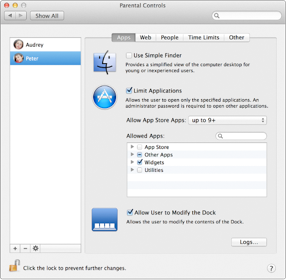
OS X Mountain Lion: How to Use Parental Controls
Apple offers us these tips for ensuring our kids have a safe and happy experience on the computer. With simple settings in Parental Controls preferences, you can manage, monitor, and control the time your kids spend on the Mac, the websites they visit, and the people...
Why Mac Is the Right Tool for Science
Apple offers this handy summary of why the Mac is a great tool for scientists. One system for all your work. Run custom scripts, open source, and commercial scientific software alongside your favorite productivity applications such as MS Office — all on your Mac. It’s...

Research Shows iPod Touch Benefits Workers with Autism
We often hear about iOS devices being used in schools and in the workplace, but a recent study from researchers at Virginia Commonwealth University shows how the device can be beneficial for those struggling with autism. The study was recently published in the the...

BMW Credits Apple with the Popularity of White Cars
Apple has impacted more just the technology industry. Interesting, according to a BMW executive, more Americans are driving white cars because of the sucessof Apple's white products. Sandy McGill, BMW Designworks lead designer for color and materials, made her...

OS X Mountain Lion: AirPlay Mirroring
OS X Mountain Lion has hundreds of new features. From time to time, Apple MacWorks will offer information about different aspects of the new OS. Today we'll feature AirPlay Mirroring. If you need help upgrading your Mac to Mountain Lion, give us a call. Wireless...

How To Password Protect Your Files
Thanks to Apple and Mountain Lion, password protecting your folders is easier then ever. This is ideal for things that you want kept unseen or safe in case your computer is stolen. The process starts by first opening Disk Utility under Utilities in the application...
Super insightful and fresh perspective.
Well explained and easy to follow.
So glad I stumbled upon this.
Looking forward to your next post!
Truly a masterpiece of content.