

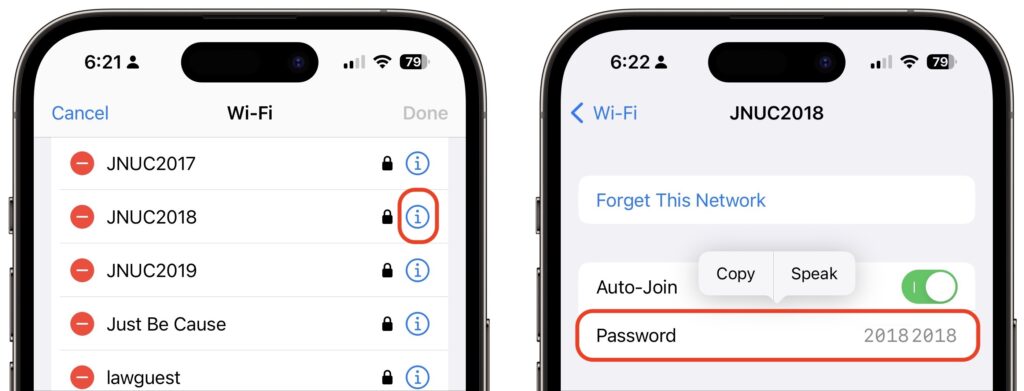
The iPhone and iPad have long allowed you to share Wi-Fi passwords with other nearby devices and people as long as they were in your Contacts list. But you couldn’t see those passwords, which is handy for sharing with non-Apple users and devices. In iOS 16 and iPadOS 16, you can now view and copy the stored Wi-Fi password for either the current network or any remembered network. In Settings > Wi-Fi, next to a network’s name (tap Edit at the top right to view stored networks), tap the blue information icon, tap Password, and authenticate to reveal the password. If desired, tap Copy to copy to the clipboard for pasting in another app, such as Mail or Messages.
(Featured image by iStock.com/denizbayram)

A week might be too short if IT approval is still pending. I'd treat "keeping your old iPhone for a…
Awesome tech breakdown on "When Should You Upgrade to macOS 27 Golden Gate, iOS 27, iPadOS 27, watchOS 27, tvOS…
I’ve used Chrome’s built-in screenshot tool, but opening DevTools every time gets a bit tedious. I recommend FullPage Capture, it’s…
This is such an important reminder. I've been in meetings where an AI notetaker silently joined and recorded everything, and…
Awesome tech breakdown on "When Should You Upgrade to macOS 27 Golden Gate, iOS 27, iPadOS 27, watchOS 27, tvOS…