

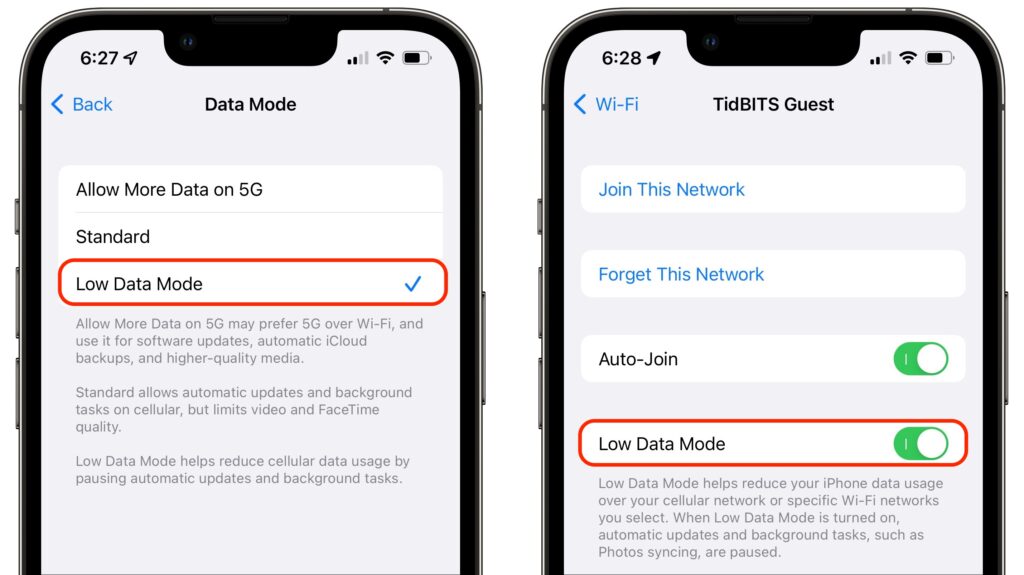
Do you need to be careful about how much data you use with your iPhone or iPad, either via cellular or Wi-Fi? That could be true for those with Internet data caps, people using an international plan while traveling, and anyone in an area with slow data speeds. To reduce your data usage, turn on Low Data Mode, which you can do separately for cellular and Wi-Fi. For cellular, look in Settings > Cellular > Cellular Data Options, where you can either enable Low Data Mode for LTE/4G or take one more step into Data Mode for 5G. If you’re using two plans with a dual SIM iPhone, you can set each one separately. For Wi-Fi, go to Settings > Wi-Fi and tap the i button next to the desired Wi-Fi network and then tap Low Data Mode. Apple lists what you can expect to change in Low Data Mode. If you need a similar capability for the Mac, check out TripMode.
(Featured image by iStock.com/Created_by_light)

Useful walkthrough. The concrete examples made the workflow much easier to follow.
Saved my day
The note that Rosetta isn’t automatically restored after the macOS 27 Golden Gate upgrade is the part that would catch…
Useful note that Live Text needs an A12 Bionic or later on iPhone and iPad but works on any Mac…
Just found text to game by Tuvimo and it actually works for quick browser fun. Makes me want to revisit…