

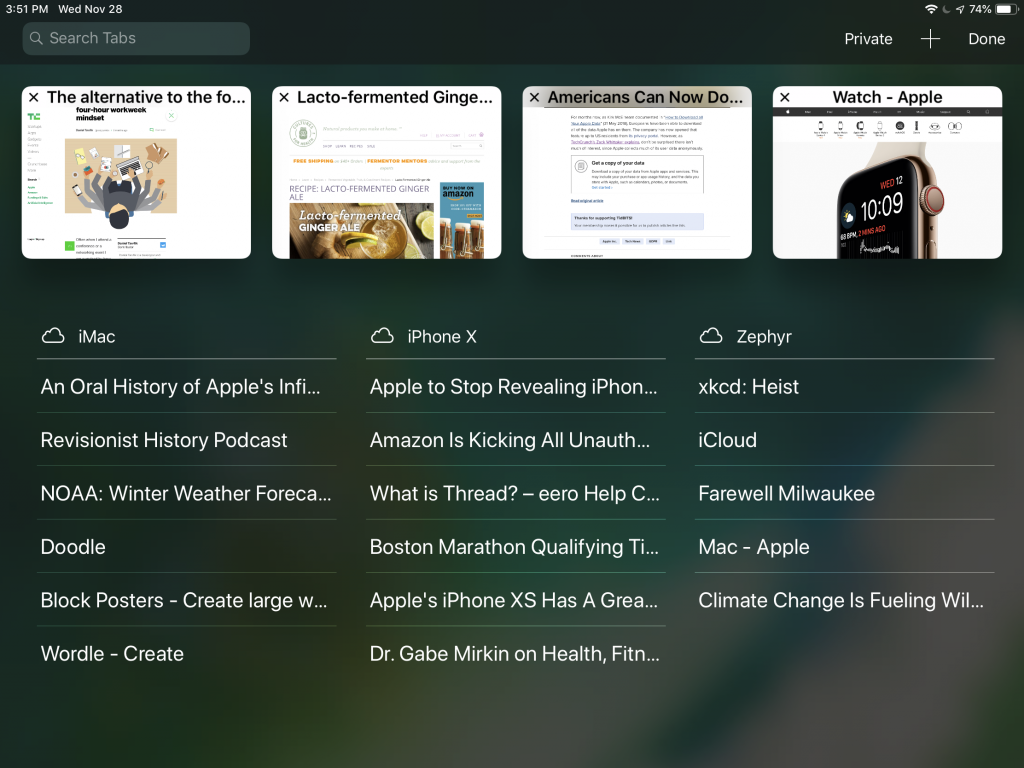
Browser tabs. They breed like bunnies, and if you’re like us, you have oodles of tabs open on your Mac, iPhone, and iPad. But you may not know that Safari has a great tab-management feature that lets you access all the open tabs on all your devices. (Make sure to enable the Safari switch in System Preferences > iCloud on the Mac and in Settings > YourName > iCloud in iOS.) This tab overview is easiest to find on the iPad, where tapping the tab  button displays local tabs as thumbnails at the top of the screen and lists tabs from other devices beneath. On the iPhone, scroll down to the bottom of the tab list to see them, and on the Mac, choose View > Show Tab Overview. Click or tap any tab to view it. To close an unnecessary tab, in iOS, swipe left and tap Close; in macOS, hover over the tab name and click the x button that appears.
If you’d like another Safari tip, check out this article about adding favicons to your Safari tabs.

A week might be too short if IT approval is still pending. I'd treat "keeping your old iPhone for a…
Awesome tech breakdown on "When Should You Upgrade to macOS 27 Golden Gate, iOS 27, iPadOS 27, watchOS 27, tvOS…
I’ve used Chrome’s built-in screenshot tool, but opening DevTools every time gets a bit tedious. I recommend FullPage Capture, it’s…
This is such an important reminder. I've been in meetings where an AI notetaker silently joined and recorded everything, and…
Awesome tech breakdown on "When Should You Upgrade to macOS 27 Golden Gate, iOS 27, iPadOS 27, watchOS 27, tvOS…