
 Image created with originals by Patrick Ward on Unsplash and Mateusz Zdrzałek from Pixabay
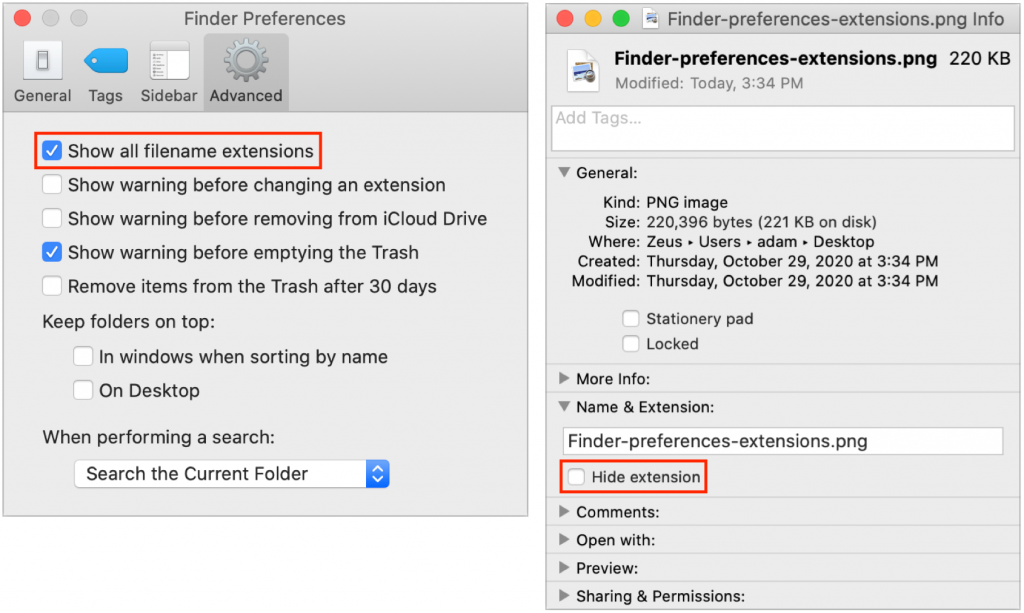
On the Mac, nearly every file has an extension, a set of characters after a period that indicates what type of file it is and determines which app opens it. So, .png indicates a PNG graphic that opens in Preview by default, .pages denotes a Pages document, and .docx identifies a file as belonging to and opening in Microsoft Word. Plus, the extension for all applications is .app. Depending on what you do, how often you exchange files with people on other platforms, and your personal preference, you may wish to see more or fewer extensions. You control that in Finder > Preferences > Advanced, with the “Show all filename extensions” checkbox. Individual files can override the setting, so if an extension isn’t doing what you want, select the file, choose File > Get Info, and check or uncheck the Hide Extension checkbox in the Info window.

Picking one style guide and living with it is the advice I give every time this question comes up, and…
Golden Gate as the macOS 27 codename is a nice callback. For mixed households I'd love a recommendation on the…
Check with your phone service provider.
Do you take orders for the new 18 or is that just at the Apple stores? Thanks
Making Wi-Fi joining as easy as scanning a QR code is exactly the kind of MacWorks tip guests actually use.