
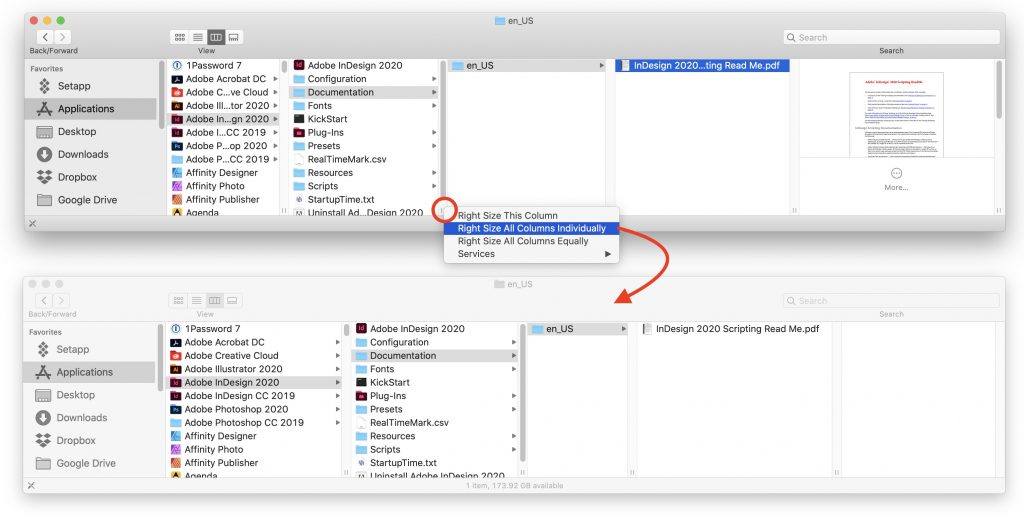
We’re big fans of column view in Finder windows (choose View > as Columns). You never have to worry about missing icons that are outside the window, everything is sorted alphabetically, and selecting a file shows a preview. But the column widths can be too thin, such that they cut off file and folder names, or too wide, forcing you to scroll unnecessarily. You probably know you can drag the handles at the bottom of the column dividers, but that’s fussy when you have lots of columns. Instead, double-click a column handle to expand or shrink the column so the longest name fits perfectly. Option-double-click a column handle to do that for all the columns showing. If you forget, Control-click a handle to see commands for Right Size This Column, Right Size All Columns Individually, and Right Size All Columns Equally.
(Featured image by nonbirinonko from Pixabay)

Picking one style guide and living with it is the advice I give every time this question comes up, and…
Golden Gate as the macOS 27 codename is a nice callback. For mixed households I'd love a recommendation on the…
Check with your phone service provider.
Do you take orders for the new 18 or is that just at the Apple stores? Thanks
Making Wi-Fi joining as easy as scanning a QR code is exactly the kind of MacWorks tip guests actually use.