
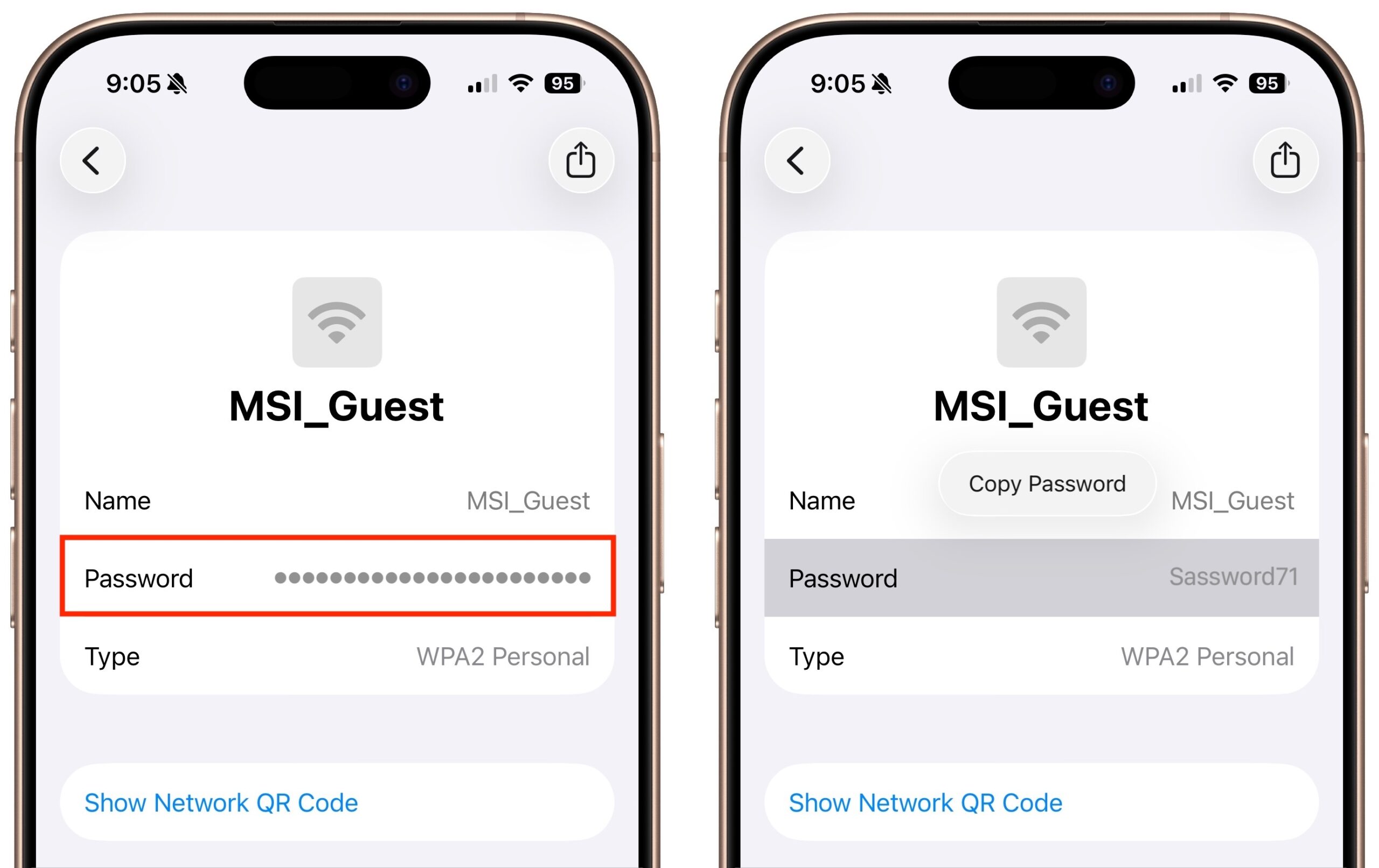
Apple offers several simple ways to share Wi-Fi network passwords. When someone nearby tries to connect to a Wi-Fi network with an iPhone, iPad, or Mac, and they are in your Contacts app, you will be automatically prompted to share the network password with them. Additionally, in the Passwords app, you can display a Wi-Fi network QR code that anyone can scan to join the network. However, sometimes you need to share a password via email or text. To look up a Wi-Fi password on an iPhone or iPad, open Passwords, tap Wi-Fi, select the desired network, and tap the obscured Password field. A Copy Password button makes it easy to copy. In the Mac version of Passwords, hover over the obscured password and click the revealed password to copy it.
(Featured image by iStock.com/jpkirakun)

Useful walkthrough. The concrete examples made the workflow much easier to follow.
Saved my day
The note that Rosetta isn’t automatically restored after the macOS 27 Golden Gate upgrade is the part that would catch…
Useful note that Live Text needs an A12 Bionic or later on iPhone and iPad but works on any Mac…
Just found text to game by Tuvimo and it actually works for quick browser fun. Makes me want to revisit…