
 Image by Noelle Otto from Pexels
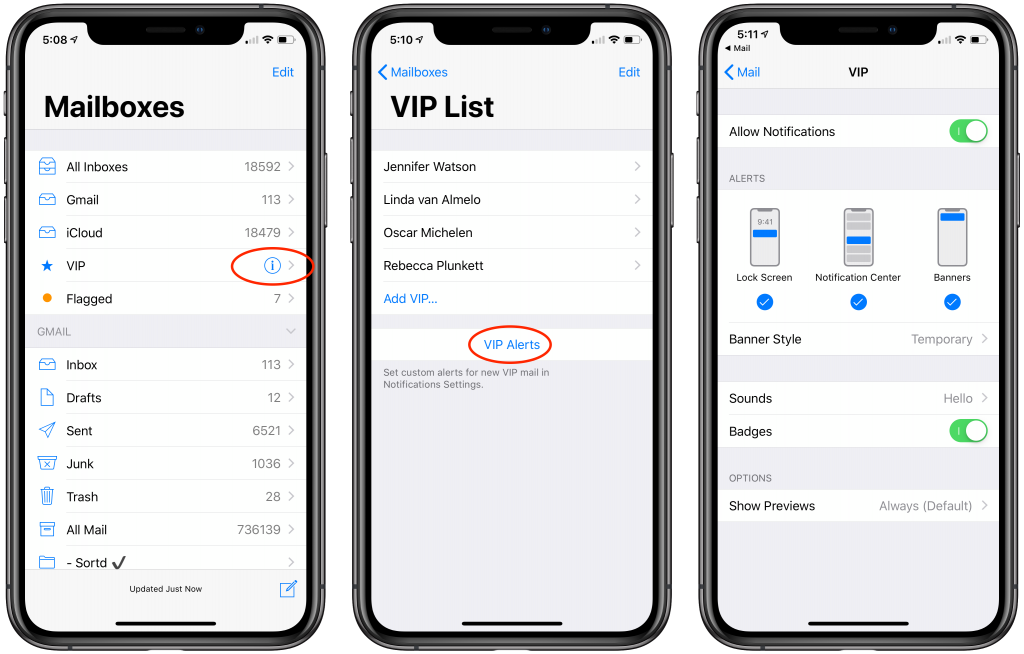
Few people get so little email that they want an iPhone notification for every message that rolls in. But many of us have just a couple of people—our personal VIPs—whose messages are important enough to warrant an alert. If that’s true for you, and you want to know right away when your boss or your spouse or your child sends you a message, set up VIP Alerts. In Mail in iOS, in your Mailboxes list, tap the i button next to the VIP mailbox. If necessary, use the Add VIP link to pick your VIPs from your contacts, and then tap VIP Alerts to jump to the screen of Settings > Notifications > Mail > VIP. Once there, you can choose a banner style, alert sound, and other notification-related settings.
More questions? Remember, we’re always available to help! Stop by either of our two stores for more information!

Picking one style guide and living with it is the advice I give every time this question comes up, and…
Golden Gate as the macOS 27 codename is a nice callback. For mixed households I'd love a recommendation on the…
Check with your phone service provider.
Do you take orders for the new 18 or is that just at the Apple stores? Thanks
Making Wi-Fi joining as easy as scanning a QR code is exactly the kind of MacWorks tip guests actually use.