
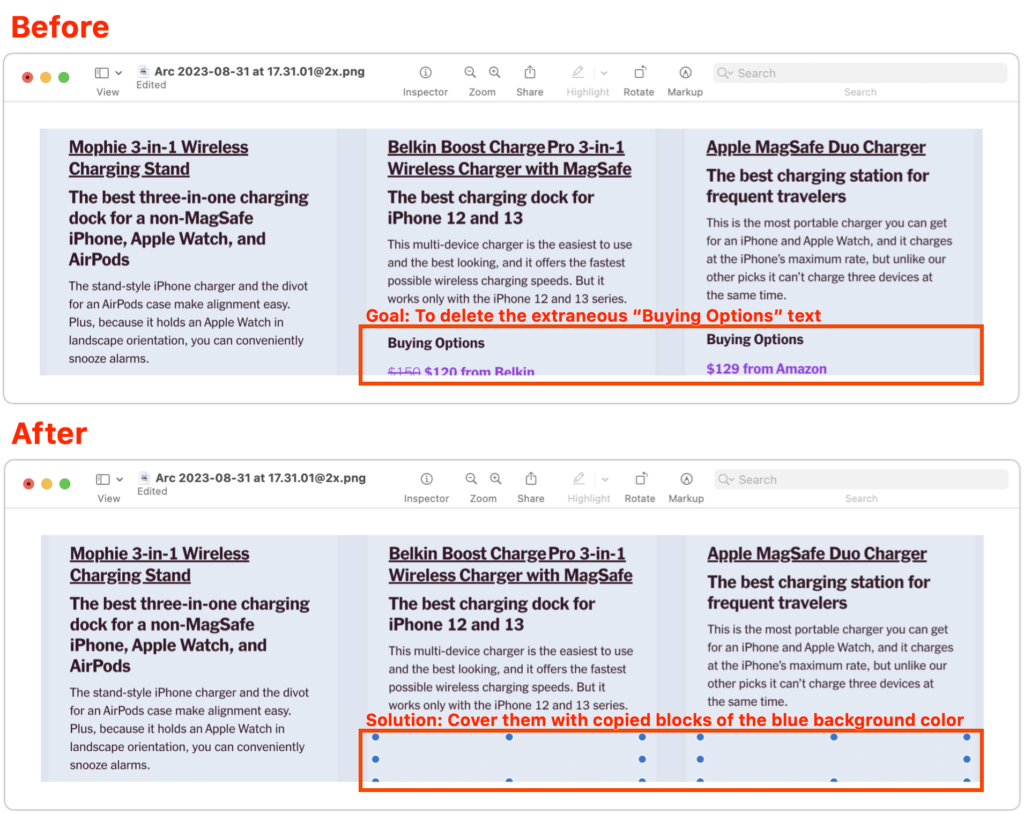
Apple’s Preview is a surprisingly capable graphics editor for making quick changes to screenshots and other illustrations, but it lacks a built-in way to delete content while leaving the background. Here’s the workaround—select a rectangle of the background color, copy it, paste it, and then move it over the undesirable content—as shown in the After screenshot below, where blue selection dots denote the pasted box. As you resize the box, press Shift to prevent it from resizing proportionally, which helps you make it the shape you want. If you need a second box of the same color, Option-drag the first box to copy it. When you save and close, your boxes will be merged into the image, permanently removing the content underneath, so make sure they’re in the right spot before moving on.
(Featured image based on an original by iStock.com/Seetwo)

Picking one style guide and living with it is the advice I give every time this question comes up, and…
Golden Gate as the macOS 27 codename is a nice callback. For mixed households I'd love a recommendation on the…
Check with your phone service provider.
Do you take orders for the new 18 or is that just at the Apple stores? Thanks
Making Wi-Fi joining as easy as scanning a QR code is exactly the kind of MacWorks tip guests actually use.