

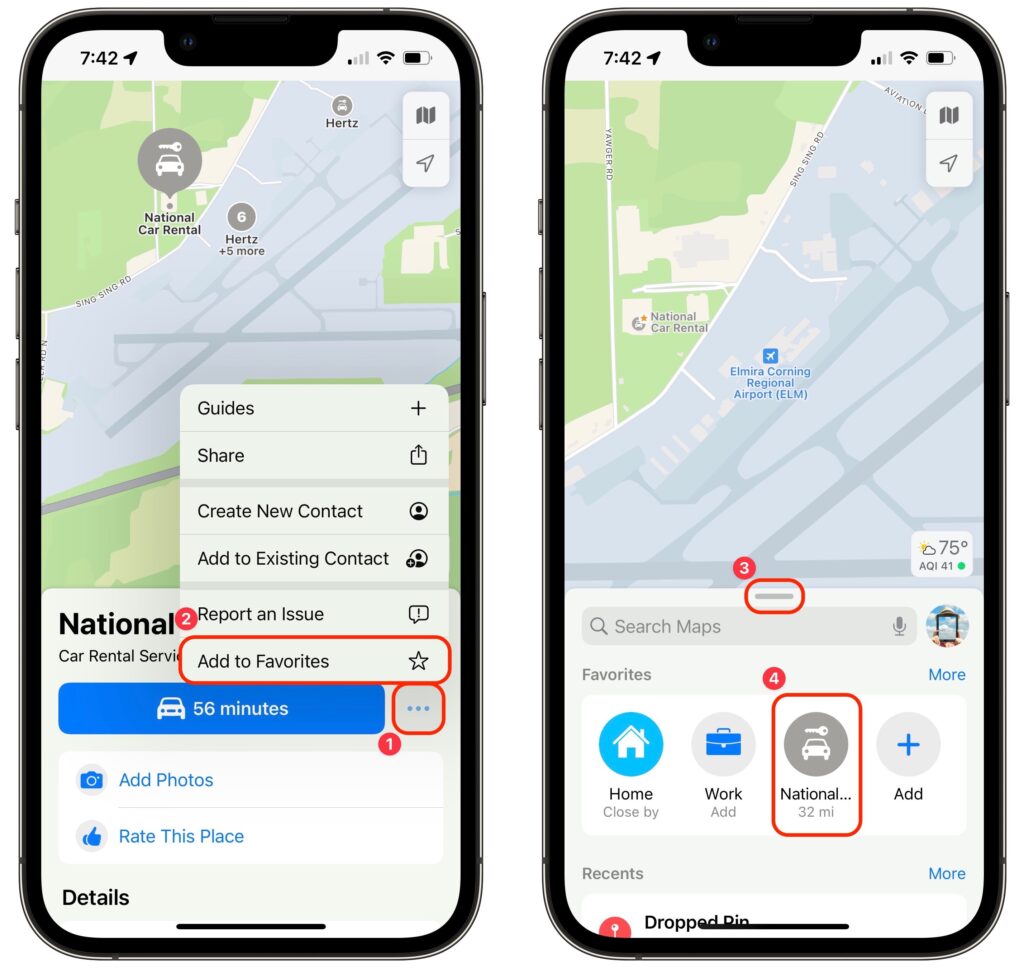
Imagine you’re on vacation, staying at an Airbnb and collecting tourist points in the surrounding area throughout the day. Since you’ll be heading back to your Airbnb regularly but may not remember its address reliably, it’s best to make it a favorite in Maps before you even leave home. That way, you can navigate to it easily without searching repeatedly or looking for it in your Recents list. Similarly, take a few minutes to add other addresses that you know you’ll need, such as the rental car dropoff spot. In Maps on the iPhone, tap the ••• button ➊ next to an address and then Add to Favorites ➋. Then, when it’s time to navigate, swipe up on the search handle ➌ and tap the favorite ➍ to get directions.
(Featured image by iStock.com/Prostock-Studio)

A week might be too short if IT approval is still pending. I'd treat "keeping your old iPhone for a…
Awesome tech breakdown on "When Should You Upgrade to macOS 27 Golden Gate, iOS 27, iPadOS 27, watchOS 27, tvOS…
I’ve used Chrome’s built-in screenshot tool, but opening DevTools every time gets a bit tedious. I recommend FullPage Capture, it’s…
This is such an important reminder. I've been in meetings where an AI notetaker silently joined and recorded everything, and…
Awesome tech breakdown on "When Should You Upgrade to macOS 27 Golden Gate, iOS 27, iPadOS 27, watchOS 27, tvOS…