
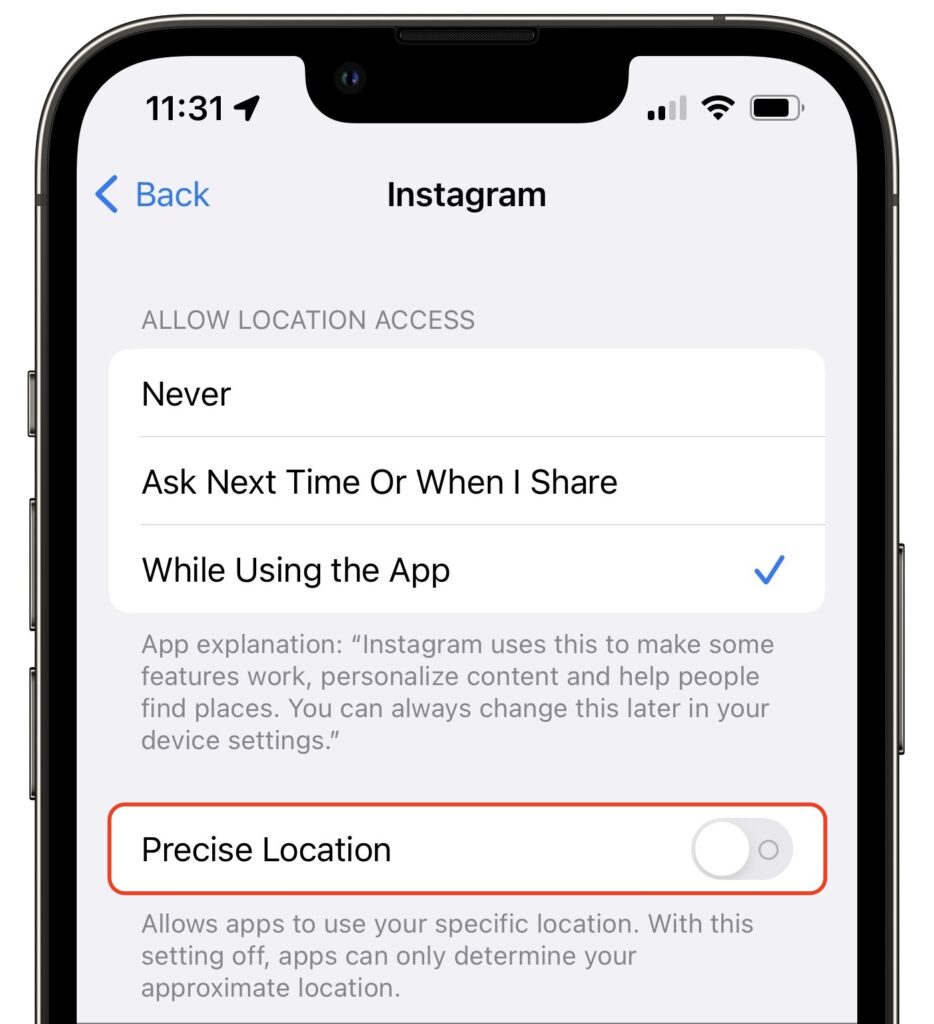
Most of the time, having your iPhone know precisely where you are is good. You want Maps to tell you exactly when to turn, not after you’ve passed an intersection. But too many apps abuse their users’ privacy. We strongly encourage you to stop using such apps entirely, but we acknowledge that it can be hard to give up apps that seem necessary for modern life. Barring that, you could prevent such apps from seeing your location at all, but even that isn’t always feasible. Since iOS 14, Apple has provided another compromise—you can prevent an app from seeing your precise location while still giving it your approximate whereabouts. Go to Settings > Privacy > Location Services, scroll down and tap the app in question, and disable Precise Location.
(Featured image by iStock.com/Melpomenem)

A week might be too short if IT approval is still pending. I'd treat "keeping your old iPhone for a…
Awesome tech breakdown on "When Should You Upgrade to macOS 27 Golden Gate, iOS 27, iPadOS 27, watchOS 27, tvOS…
I’ve used Chrome’s built-in screenshot tool, but opening DevTools every time gets a bit tedious. I recommend FullPage Capture, it’s…
This is such an important reminder. I've been in meetings where an AI notetaker silently joined and recorded everything, and…
Awesome tech breakdown on "When Should You Upgrade to macOS 27 Golden Gate, iOS 27, iPadOS 27, watchOS 27, tvOS…