
The Austin MacWorks Official Blog
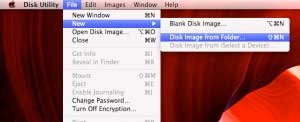
How To Password Protect Your Files
Thanks to Apple and Mountain Lion, password protecting your folders is easier then ever. This is ideal for things that you want kept unseen or safe in case your computer is stolen. The process starts by first opening Disk Utility under Utilities in the application...

OS X Mountain Lion: Calendar
OS X Mountain Lion has hundreds of new features. From time to time, Apple MacWorks will feature different aspects of the new OS. Today, we'll look at some of the great Calendar features of OS X Mountain Lion. If you need help upgrading to Mountain Lion, stop in to...

View Multi-page Previews of Word Files on Finder Icons
Mountain Lion has added the ability to view multi-page previews of Word documents when you hover your cursor over the icon, as has been possible with PDFs since Lion. To see a preview, hover your cursor over a Word document. You'll see two arrow icons on the document...
OS X Mountain Lion: Auto Save Features
OS X Mountain Lion has hundreds of new features. From time to time, Apple MacWorks will feature different aspects of the new OS. Today, we'll look at some of the great Auto Save features of OS X Mountain Lion. If you need help upgrading to Mountain Lion, stop in to...

How To Restore Your Mac From a Time Machine Backup
With Time Machine you can go "back in time" to restore files, versions of files, or your entire system. Make sure your backup drive is connected and mounted (if not, Time Machine will alert you that "Your Time Machine backup disk can't be found." If prompted, enter an...

How to Backup Your Mac Using Time Machine
Setting up Time Machine is as easy as connecting an external drive to your Mac via Thunderbolt, FireWire or USB. You can also use a secondary internal drive if your desktop Mac has one (that is, a drive that you don't start up from). If you haven't specified a Time...
Super insightful and fresh perspective.
Well explained and easy to follow.
So glad I stumbled upon this.
Looking forward to your next post!
Truly a masterpiece of content.