

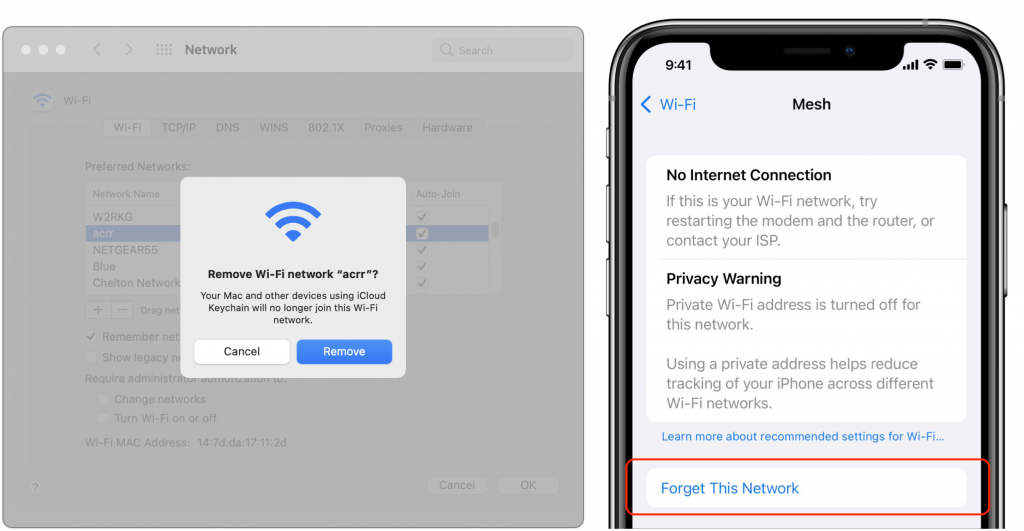
It’s easy, particularly when traveling, to end up connecting to a Wi-Fi network that doesn’t provide Internet access, requires credentials you don’t have, or lacks access to the network’s printer. Unfortunately, once your iPhone, iPad, or Mac has connected to such a network, it may reconnect to it later, causing consternation when things don’t work. The solution? Whenever you realize a Wi-Fi network is worthless, forget it. (The network, that is.) On the Mac, open System Preferences > Network > Wi-Fi > Advanced > Wi-Fi, select the network in the list (you don’t have to be connected to it), click the – button, and click Remove. On an iPhone or iPad, when you’re connected to the offending network, go to Settings > Wi-Fi, tap the i button to the right of the current network, and tap Forget This Network on the next screen.
(Featured image based on images by iStock.com/fizkes and Elena Pimukova)

A week might be too short if IT approval is still pending. I'd treat "keeping your old iPhone for a…
Awesome tech breakdown on "When Should You Upgrade to macOS 27 Golden Gate, iOS 27, iPadOS 27, watchOS 27, tvOS…
I’ve used Chrome’s built-in screenshot tool, but opening DevTools every time gets a bit tedious. I recommend FullPage Capture, it’s…
This is such an important reminder. I've been in meetings where an AI notetaker silently joined and recorded everything, and…
Awesome tech breakdown on "When Should You Upgrade to macOS 27 Golden Gate, iOS 27, iPadOS 27, watchOS 27, tvOS…