

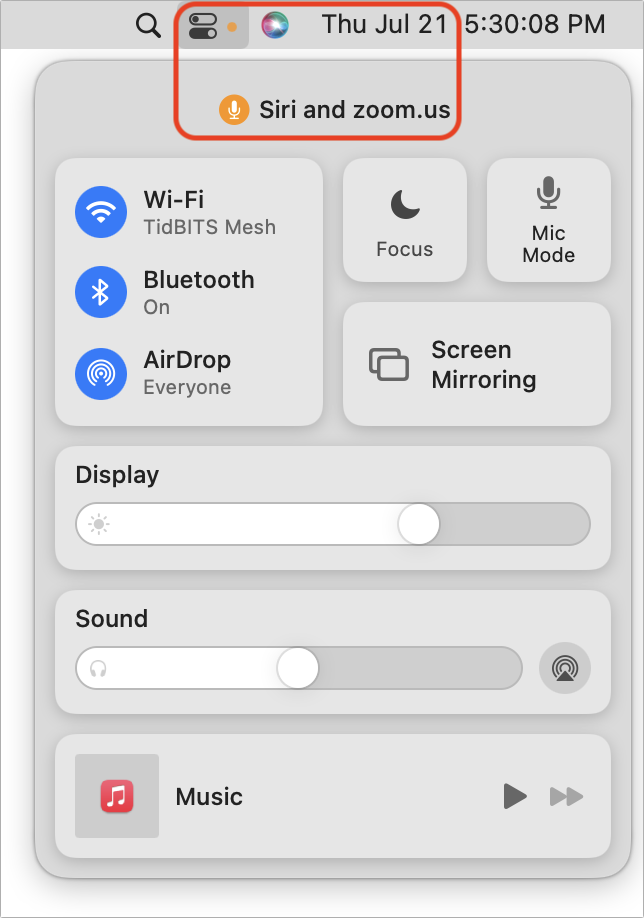
Have you noticed a little orange dot next to the icon for Control Center on the menu bar in macOS 12 Monterey? (And if not, you can’t miss it now.) Apple added that dot to alert you that something is using the Mac’s microphone to listen to the room. Click the Control Center icon to see which apps are using the mic. In nearly all situations, it will be entirely innocuous: Siri needs to listen for the “Hey, Siri” trigger, as in the screenshot below, and the Zoom app needs microphone access to provide audio in a video call. But if you don’t recognize the app that’s listening, you’ll want to look into it to make sure there’s nothing creepy going on.
(Featured image by iStock.com/Mihajlo Maricic)

Picking one style guide and living with it is the advice I give every time this question comes up, and…
Golden Gate as the macOS 27 codename is a nice callback. For mixed households I'd love a recommendation on the…
Check with your phone service provider.
Do you take orders for the new 18 or is that just at the Apple stores? Thanks
Making Wi-Fi joining as easy as scanning a QR code is exactly the kind of MacWorks tip guests actually use.