

Image by Ketut Subiyanto from Pexels
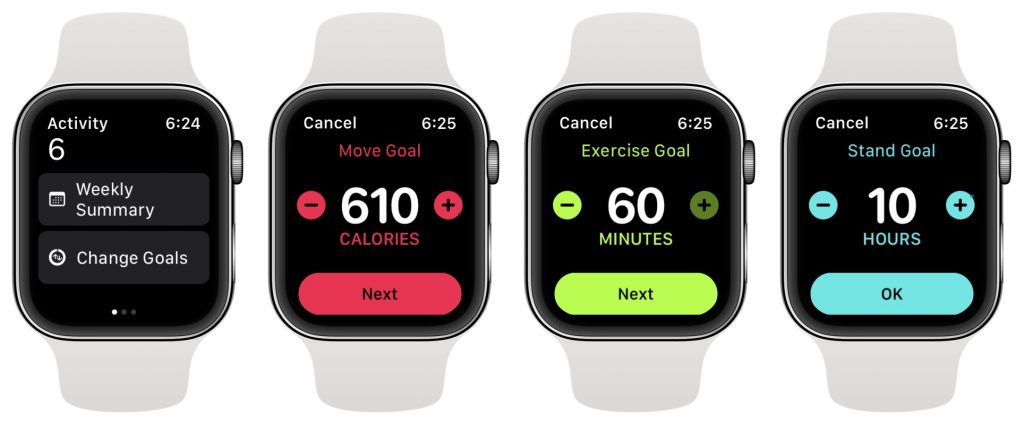
Ever since Apple introduced the Activity app to watchOS, you’ve been able to adjust your Move goal, which is measured in kilocalories, but your Exercise goal was locked at 30 minutes and the Stand goal at 12 hours. In watchOS 7, you can finally change these last two. In the Activity app on your Apple Watch, scroll to the bottom and tap Change Goals. Then, for each screen, adjust the goal numbers in whatever way will most motivate you. Some people like setting the goals higher than they’re likely to reach so they can more easily see how well they’ve done as a percent of the whole, whereas others might like to tweak them so the goals are just a little out of reach.

A week might be too short if IT approval is still pending. I'd treat "keeping your old iPhone for a…
Awesome tech breakdown on "When Should You Upgrade to macOS 27 Golden Gate, iOS 27, iPadOS 27, watchOS 27, tvOS…
I’ve used Chrome’s built-in screenshot tool, but opening DevTools every time gets a bit tedious. I recommend FullPage Capture, it’s…
This is such an important reminder. I've been in meetings where an AI notetaker silently joined and recorded everything, and…
Awesome tech breakdown on "When Should You Upgrade to macOS 27 Golden Gate, iOS 27, iPadOS 27, watchOS 27, tvOS…