

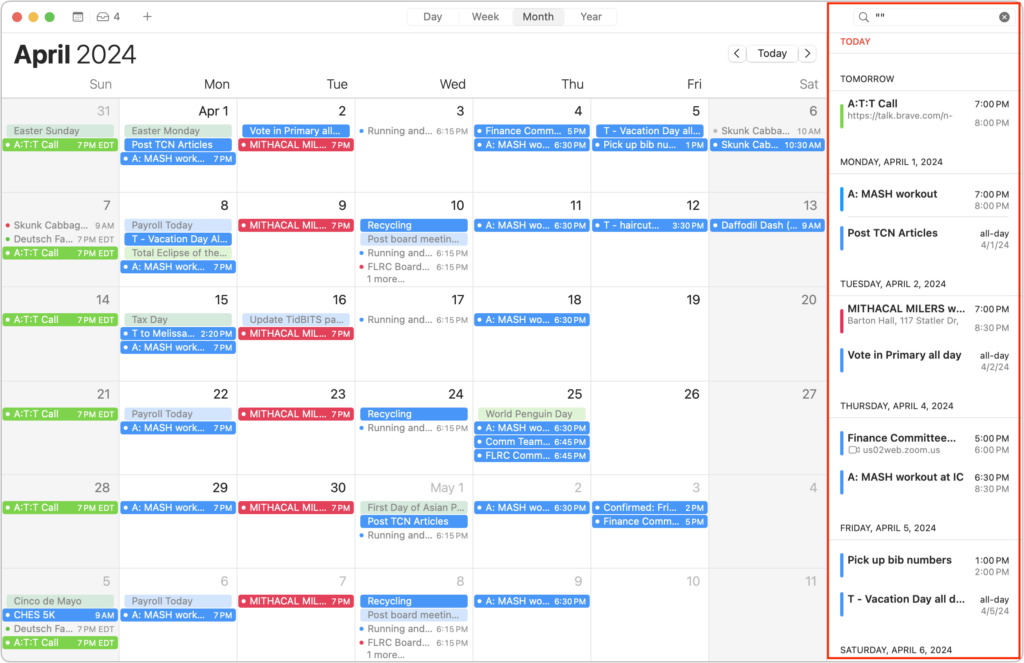
Along with day, week, month, and year views, most calendar apps offer the option of a simple chronological list of events, which can be a handy way to see what’s coming up. Apple’s Calendar app on the Mac is unfortunately not among those apps. However, there is a trick you can use to get it to show all your upcoming events in a scrolling list. Click in the Search field in the upper-right corner and enter two double quote marks (“”). In essence, it’s a search for “everything,” and Calendar promptly shows all your events in a row down the right side of the window. If you’re looking for a more capable calendar app, BusyCal and Fantastical are popular in the Mac community, and some apps like Microsoft Outlook and Zoom also include calendaring features.
(Featured image by iStock.com/AndreyPopov)

A week might be too short if IT approval is still pending. I'd treat "keeping your old iPhone for a…
Awesome tech breakdown on "When Should You Upgrade to macOS 27 Golden Gate, iOS 27, iPadOS 27, watchOS 27, tvOS…
I’ve used Chrome’s built-in screenshot tool, but opening DevTools every time gets a bit tedious. I recommend FullPage Capture, it’s…
This is such an important reminder. I've been in meetings where an AI notetaker silently joined and recorded everything, and…
Awesome tech breakdown on "When Should You Upgrade to macOS 27 Golden Gate, iOS 27, iPadOS 27, watchOS 27, tvOS…