
 Image by Dan Gold on Unsplash
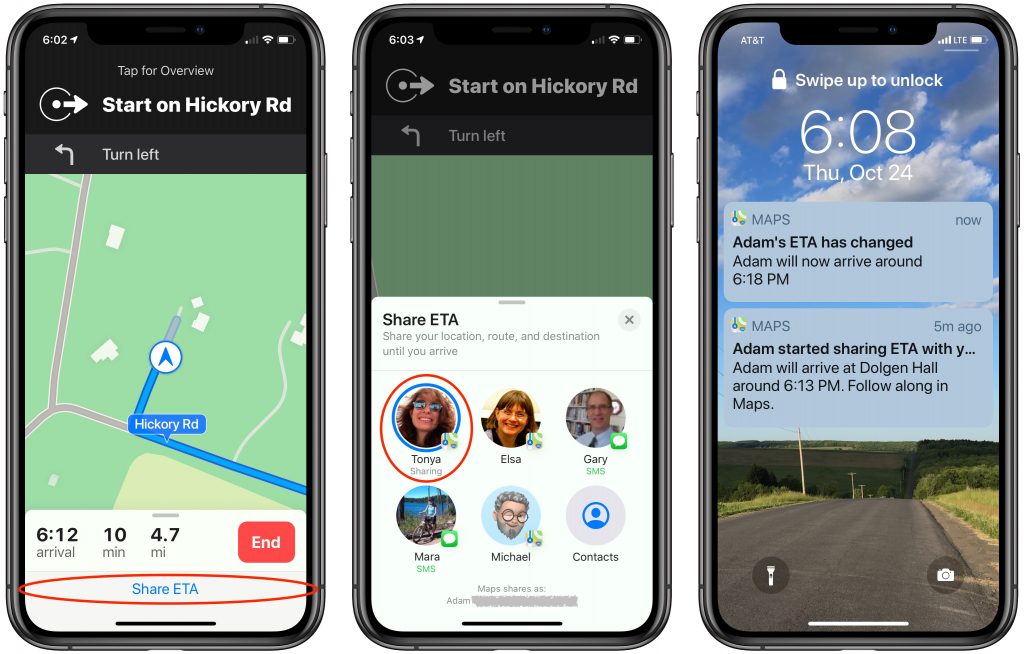
A small but welcome new feature of iOS 13 is Driving ETA, which helps you share your estimated time of arrival with a contact whenever you’re navigating with the Maps app. To use Driving ETA, start navigating to a destination in Maps, tap Share ETA at the bottom of the screen, and pick the person with whom you want to share your location and arrival time. (You’ll share in Maps with iOS 13 users and via Messages with everyone else.) The other person will receive a notification of your ETA and if you’re delayed, updated times. You do have to start navigation in Maps to use Driving ETA, so it’s a little inconvenient when you already know the route, but it’s a brilliant feature for long-distance trips.

A week might be too short if IT approval is still pending. I'd treat "keeping your old iPhone for a…
Awesome tech breakdown on "When Should You Upgrade to macOS 27 Golden Gate, iOS 27, iPadOS 27, watchOS 27, tvOS…
I’ve used Chrome’s built-in screenshot tool, but opening DevTools every time gets a bit tedious. I recommend FullPage Capture, it’s…
This is such an important reminder. I've been in meetings where an AI notetaker silently joined and recorded everything, and…
Awesome tech breakdown on "When Should You Upgrade to macOS 27 Golden Gate, iOS 27, iPadOS 27, watchOS 27, tvOS…