

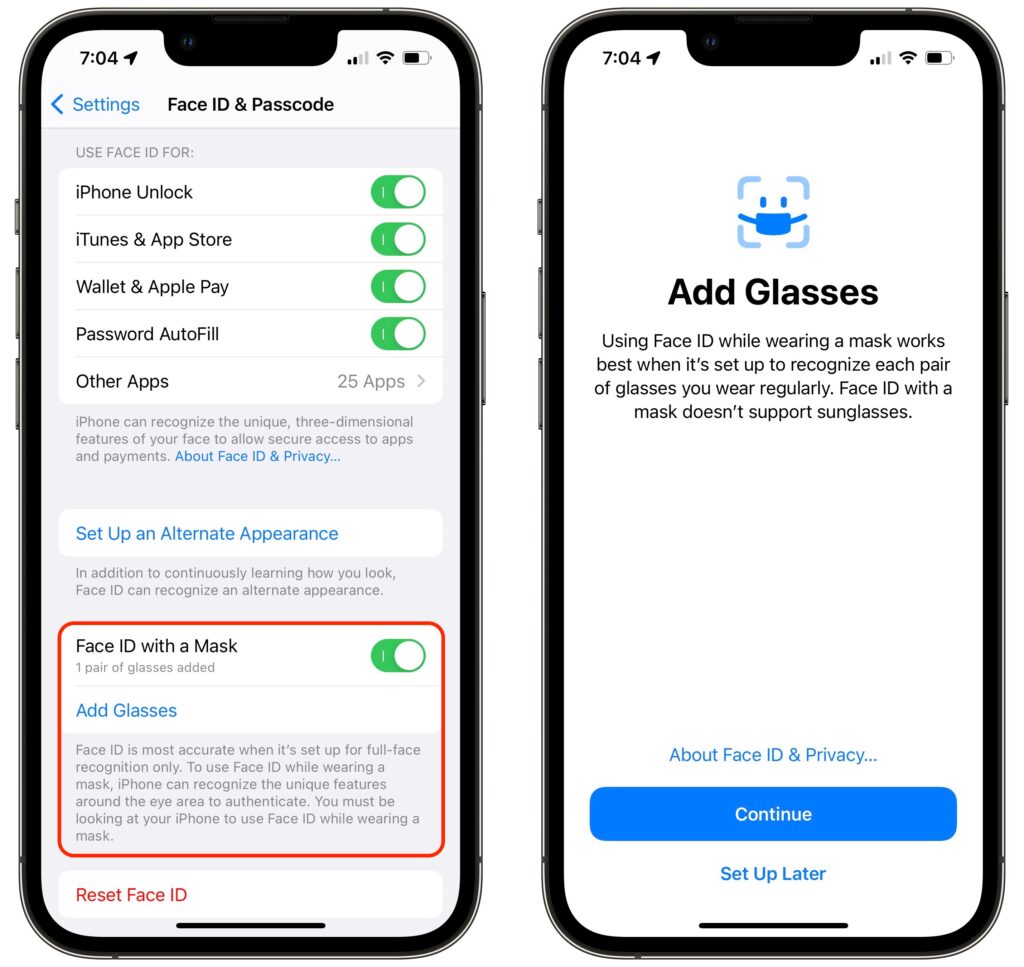
Shortly after the start of the COVID-19 pandemic, Apple made it so your Apple Watch could unlock your Face ID-enabled iPhone when you were wearing a mask. Starting in iOS 15.4, the company has taken the next step and enabled Face ID on the iPhone 12 and later to work even when you’re wearing a mask. If you didn’t already set up Face ID with a mask after updating to iOS 15.4, go to Settings > Face ID & Passcode and enable Face ID with a Mask. You’ll have to run through the Face ID training sequence again, and more than once if you sometimes wear glasses, but it’s quick and easy. Face ID may not work quite as well when you’re wearing a mask, and it doesn’t support sunglasses, but it’s way better than having to enter your passcode whenever you’re masked.
(Featured image by iStock.com/Prostock-Studio)

A week might be too short if IT approval is still pending. I'd treat "keeping your old iPhone for a…
Awesome tech breakdown on "When Should You Upgrade to macOS 27 Golden Gate, iOS 27, iPadOS 27, watchOS 27, tvOS…
I’ve used Chrome’s built-in screenshot tool, but opening DevTools every time gets a bit tedious. I recommend FullPage Capture, it’s…
This is such an important reminder. I've been in meetings where an AI notetaker silently joined and recorded everything, and…
Awesome tech breakdown on "When Should You Upgrade to macOS 27 Golden Gate, iOS 27, iPadOS 27, watchOS 27, tvOS…