
 Image by kyle smith on Unsplash
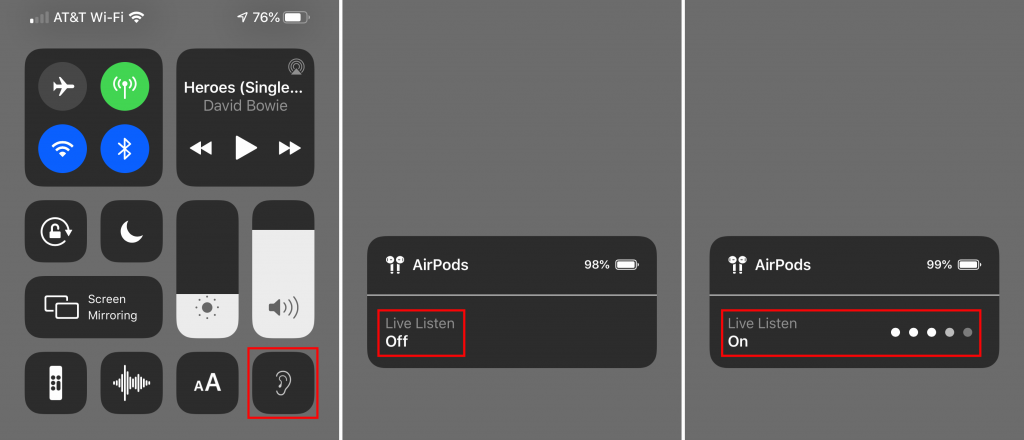
An ever-increasing number of people have hearing loss due to exposure to loud noise and age. If you’re in that group, but don’t yet need hearing aids, try using your AirPods to help you hear better in certain situations. iOS’s Live Listen feature uses your iPhone’s mic to pick up specific sounds and then sends that audio directly to your AirPods, helping you focus on what you want to hear. To enable Live Listen, go to Settings > Control Center > Customize Controls and tap the green + button next to Hearing. Then put your AirPods in, open Control Center, tap the Hearing button, and tap to turn on Live Listen. Fine-tune what you’re hearing by moving the iPhone closer to what you want to hear and pointing the mic at the source of the sound—pay attention to the sound level meter dots—and by adjusting the iPhone’s volume controls. To stop listening, tap Live Listen again or just remove your AirPods.

Stop by either store and let's see if we can figure it out together!
Stop by either store and let's see if we can figure it out together!
Stop by either store, and we'll be happy to see what we can do to help you.
Stop by either store, and we'll be happy to see what we can do.
Useful read. I have been tinkering with virtual machines on my Mac recently, and this fits neatly into the things…