

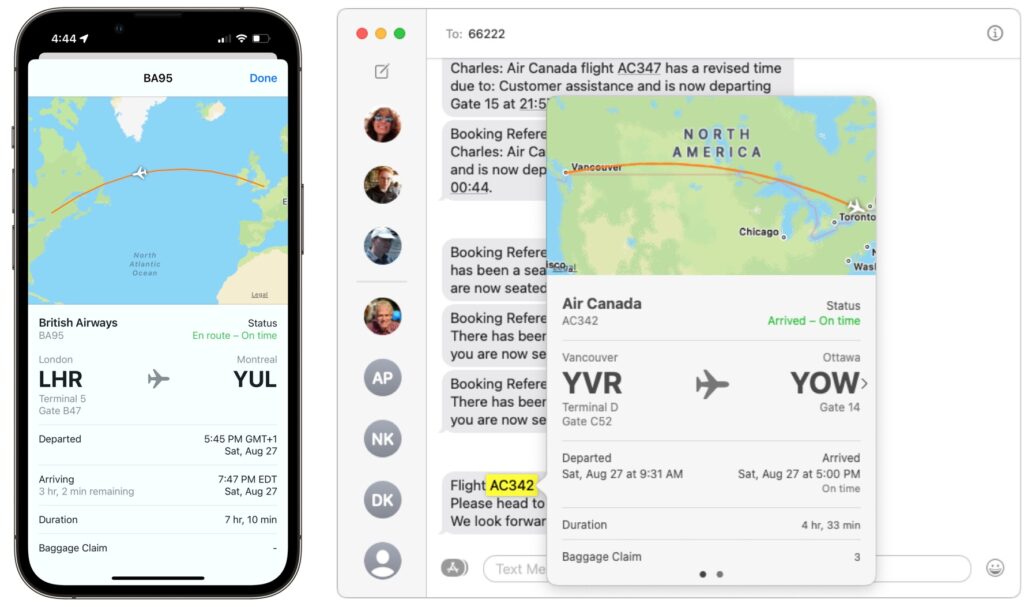
Next time you’re flying to visit your Apple-using family or friends, send them your flight number using Messages when you leave. Then they can easily track your flight in the air and see when you’re arriving. Just text them the flight number prefixed with the airline’s abbreviation, like AA for American Airlines, AC for Air Canada, BA for British Air, DL for Delta, or UA for United Airlines. If Messages recognizes the flight number, it will underline it to indicate that tapping or clicking will bring up the current flight information. This feature also helps you extract more information from a texted flight status update that an airline sends to you. If you know a flight number but don’t have it in Messages, you can get the same information on the Mac using Spotlight (press Command-Space). On an iPhone or iPad, use the Search feature (pull down on the Home screen).
(Featured image by iStock.com/SamAntonioPhotography)

A week might be too short if IT approval is still pending. I'd treat "keeping your old iPhone for a…
Awesome tech breakdown on "When Should You Upgrade to macOS 27 Golden Gate, iOS 27, iPadOS 27, watchOS 27, tvOS…
I’ve used Chrome’s built-in screenshot tool, but opening DevTools every time gets a bit tedious. I recommend FullPage Capture, it’s…
This is such an important reminder. I've been in meetings where an AI notetaker silently joined and recorded everything, and…
Awesome tech breakdown on "When Should You Upgrade to macOS 27 Golden Gate, iOS 27, iPadOS 27, watchOS 27, tvOS…