

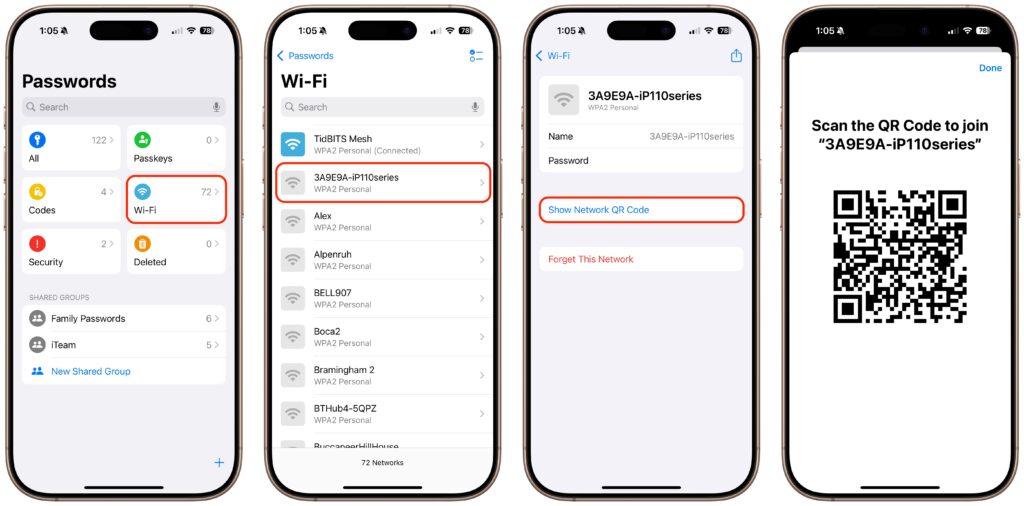
A neat feature built into iOS, iPadOS, and macOS is that when you are connected to a Wi-Fi network, your devices will offer to share the Wi-Fi password if others near you try to connect to the same network. However, for this feature to work, they must be in your Contacts, and at times, it doesn’t activate as quickly as you’d like. Apple’s new Passwords app on an iPhone, iPad, or Mac provides a manual alternative that may work better. Tap the Wi-Fi collection to see all your remembered networks, select the desired network, and tap Show Network QR Code. When others scan the QR code using their phones, they will instantly join the network.
(Featured image by iStock.com/PrathanChorruangsak)

A week might be too short if IT approval is still pending. I'd treat "keeping your old iPhone for a…
Awesome tech breakdown on "When Should You Upgrade to macOS 27 Golden Gate, iOS 27, iPadOS 27, watchOS 27, tvOS…
I’ve used Chrome’s built-in screenshot tool, but opening DevTools every time gets a bit tedious. I recommend FullPage Capture, it’s…
This is such an important reminder. I've been in meetings where an AI notetaker silently joined and recorded everything, and…
Awesome tech breakdown on "When Should You Upgrade to macOS 27 Golden Gate, iOS 27, iPadOS 27, watchOS 27, tvOS…