

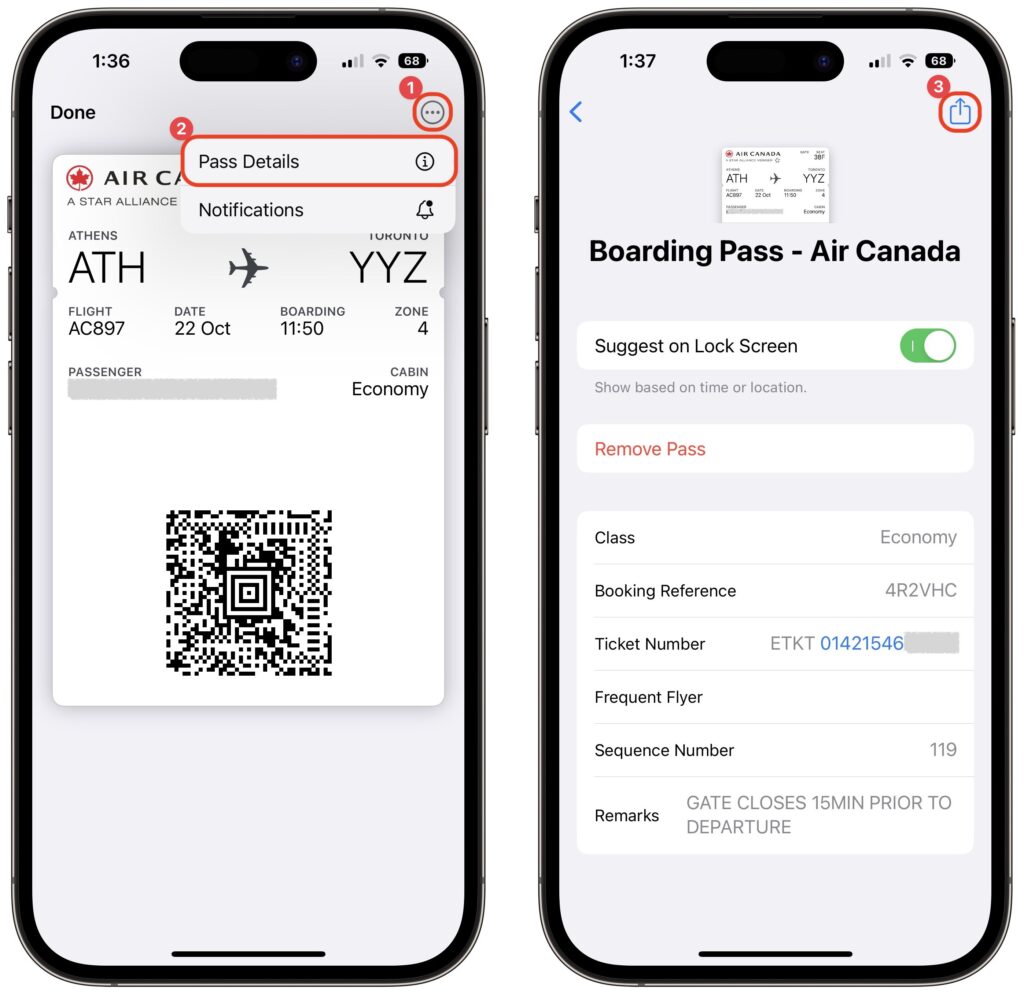
It’s common for one person in a family to handle booking airline tickets and thus to be in charge of checking in for the flight online and downloading boarding passes. If that’s you, what’s the best way to send each iPhone-wielding person in your family their own boarding pass? Rather than tussle with sharing the check-in confirmation email, add all the family boarding passes to Wallet on your iPhone. Then, for each person’s boarding pass, tap the ••• button ➊, tap Pass Details ➋, tap the share icon in the upper-right corner ➌, and share the pass via AirDrop or any other standard method. When the person receives it, they’ll be prompted to add the pass to their Wallet app.
(Featured image by iStock.com/IPGGutenbergUKLtd)

A week might be too short if IT approval is still pending. I'd treat "keeping your old iPhone for a…
Awesome tech breakdown on "When Should You Upgrade to macOS 27 Golden Gate, iOS 27, iPadOS 27, watchOS 27, tvOS…
I’ve used Chrome’s built-in screenshot tool, but opening DevTools every time gets a bit tedious. I recommend FullPage Capture, it’s…
This is such an important reminder. I've been in meetings where an AI notetaker silently joined and recorded everything, and…
Awesome tech breakdown on "When Should You Upgrade to macOS 27 Golden Gate, iOS 27, iPadOS 27, watchOS 27, tvOS…