

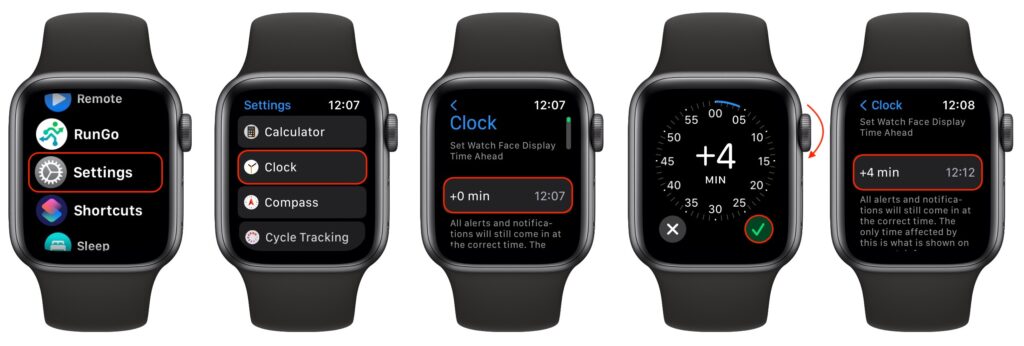
People living in Austin, and others in fact, who tend to cut things tight have a time-honored tradition of setting their watches ahead by a few minutes. That way, when you glance at your watch and realize that you need to leave, you actually have a few more minutes. You can do this with your Apple Watch, but only on the watch itself. Press the Digital Crown to see your apps, tap Settings, scroll down to and tap Clock, tap the button for Set Watch Face Display Time Ahead, and use the Digital Crown to choose your desired time adjustment. Note that this setting affects only the time you see on the watch face. All alarms and notifications will come in at the correct times.
(Featured image by iStock.com/Bobex-73)

A week might be too short if IT approval is still pending. I'd treat "keeping your old iPhone for a…
Awesome tech breakdown on "When Should You Upgrade to macOS 27 Golden Gate, iOS 27, iPadOS 27, watchOS 27, tvOS…
I’ve used Chrome’s built-in screenshot tool, but opening DevTools every time gets a bit tedious. I recommend FullPage Capture, it’s…
This is such an important reminder. I've been in meetings where an AI notetaker silently joined and recorded everything, and…
Awesome tech breakdown on "When Should You Upgrade to macOS 27 Golden Gate, iOS 27, iPadOS 27, watchOS 27, tvOS…