
 Image by insung yoon on Unsplash
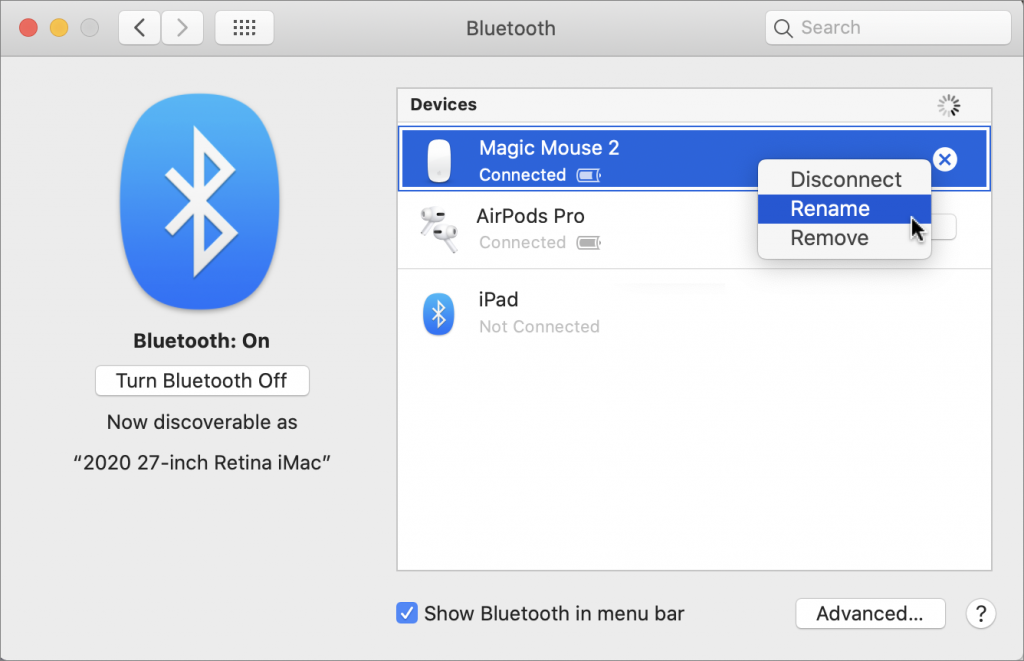
It’s all too easy to end up with a boatload of Bluetooth devices connected to your Mac. Apple devices will likely have sensible names, like Magic Mouse 2, but what if someone has given you a device with their name in it? Or you’ve ended up with a device called something really random like f023cp37. Happily, macOS lets you rename most Bluetooth devices, including pointing devices, keyboards, earbuds, and headphones. Open System Preferences > Bluetooth, Control- or right-click a device, and choose Rename. In the dialog that appears, enter the new name.

A week might be too short if IT approval is still pending. I'd treat "keeping your old iPhone for a…
Awesome tech breakdown on "When Should You Upgrade to macOS 27 Golden Gate, iOS 27, iPadOS 27, watchOS 27, tvOS…
I’ve used Chrome’s built-in screenshot tool, but opening DevTools every time gets a bit tedious. I recommend FullPage Capture, it’s…
This is such an important reminder. I've been in meetings where an AI notetaker silently joined and recorded everything, and…
Awesome tech breakdown on "When Should You Upgrade to macOS 27 Golden Gate, iOS 27, iPadOS 27, watchOS 27, tvOS…