
 Image based on originals by Denny Müller on Unsplash and Mahir Uysal on Unsplash
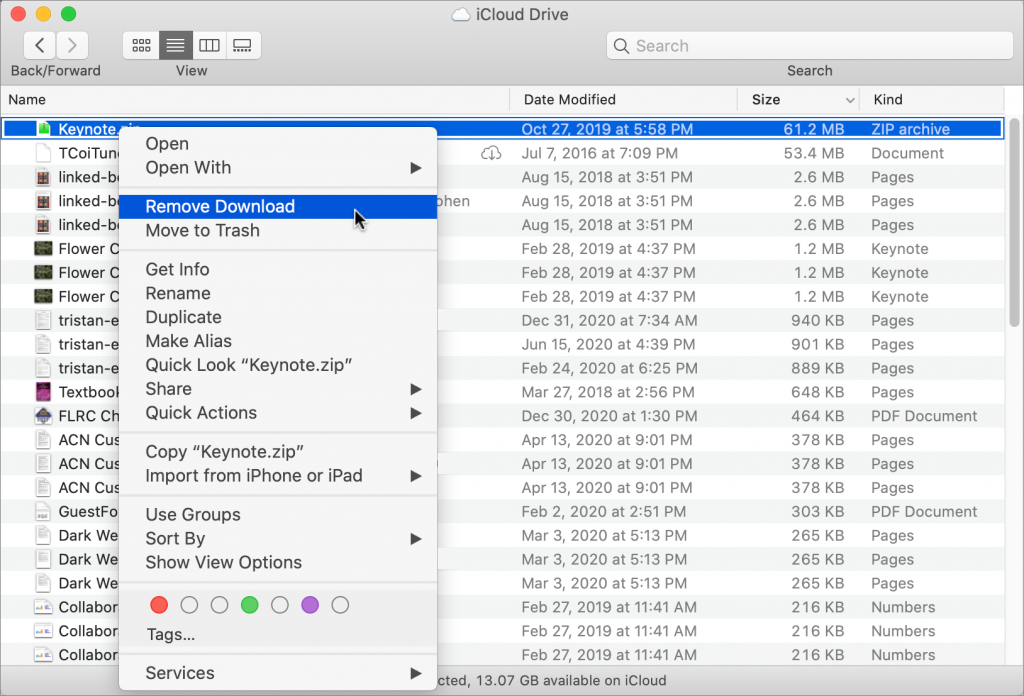
With iCloud Drive, Apple provides an Optimize Mac Storage checkbox that, when checked, stores the full contents of iCloud Drive on the Mac only if there’s enough space. However, you may wish to recover local storage space without selecting that option—luckily, that’s easy to do. Open iCloud Drive in the Finder, Control-click a file, and choose Remove Download. The file remains in iCloud Drive, and if you need it locally, you can click the cloud icon next to its name to download it. If you’re not sure which files in the iCloud Drive window occupy the most space, choose View > As List, and then click the Size column so the largest files sort to the top (click again if they’re sorting to the bottom).

A week might be too short if IT approval is still pending. I'd treat "keeping your old iPhone for a…
Awesome tech breakdown on "When Should You Upgrade to macOS 27 Golden Gate, iOS 27, iPadOS 27, watchOS 27, tvOS…
I’ve used Chrome’s built-in screenshot tool, but opening DevTools every time gets a bit tedious. I recommend FullPage Capture, it’s…
This is such an important reminder. I've been in meetings where an AI notetaker silently joined and recorded everything, and…
Awesome tech breakdown on "When Should You Upgrade to macOS 27 Golden Gate, iOS 27, iPadOS 27, watchOS 27, tvOS…