
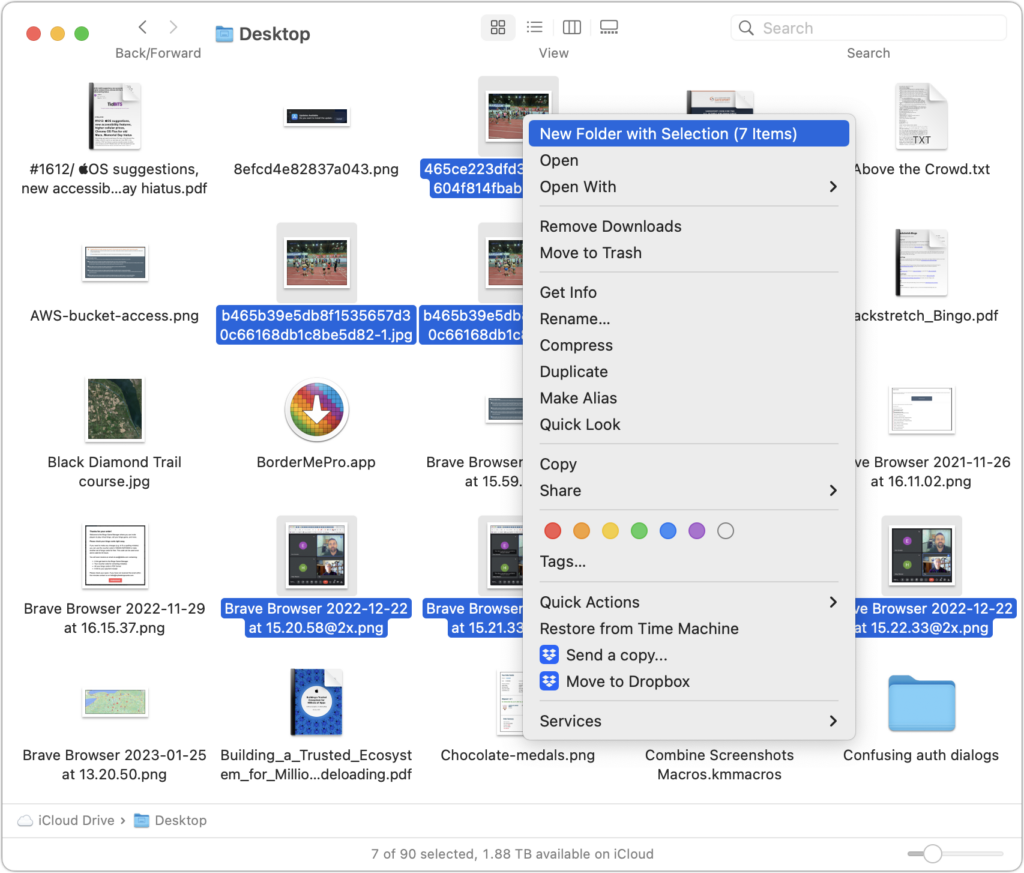
Imagine that you’re working with a bunch of files, and you want to put a set of them in a new folder. You could stop what you’re doing, make a new folder, select all the files, and drag them into the folder, like an animal. Or you could take advantage of a slick Finder command that Apple added in macOS 11 Big Sur. Simply select the files you want to put in a folder, Control-click one of them, and choose New Folder with Selection (X Items) from the top of the contextual menu. A folder called “New Folder With Items” appears, with your selected files inside. This feature may not be life-changing, but some people use it often.
(Featured image by iStock.com/ArLawKa AungTun)

Useful walkthrough. The concrete examples made the workflow much easier to follow.
Saved my day
The note that Rosetta isn’t automatically restored after the macOS 27 Golden Gate upgrade is the part that would catch…
Useful note that Live Text needs an A12 Bionic or later on iPhone and iPad but works on any Mac…
Just found text to game by Tuvimo and it actually works for quick browser fun. Makes me want to revisit…