

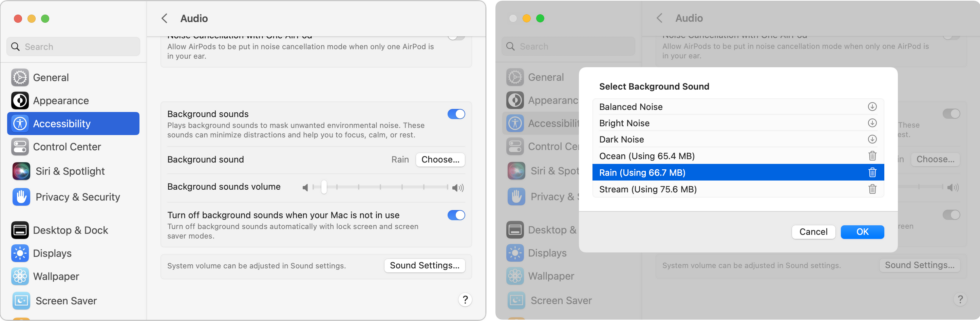
Do you have trouble concentrating at work because of a loud office environment? Or do you work at home and want to block out the sounds of kids or appliances? In macOS 13 Ventura, Apple added background sounds you can play to mask what’s going on around you. Go to System Settings > Accessibility > Audio and enable Background Sounds. You can pick a sound, set the volume, and select an option to turn the sound off when your Mac is inactive. Next time you’re mentally stewing over it being too loud to work, try this feature. A pair of AirPods (Pro or Max, in particular) might be helpful, too. If you find background sounds helpful but want more variety, look for websites like A Soft Murmur or apps like Noizio.
(Featured image by iStock.com/Apiwan Borrikonratchata)

A week might be too short if IT approval is still pending. I'd treat "keeping your old iPhone for a…
Awesome tech breakdown on "When Should You Upgrade to macOS 27 Golden Gate, iOS 27, iPadOS 27, watchOS 27, tvOS…
I’ve used Chrome’s built-in screenshot tool, but opening DevTools every time gets a bit tedious. I recommend FullPage Capture, it’s…
This is such an important reminder. I've been in meetings where an AI notetaker silently joined and recorded everything, and…
Awesome tech breakdown on "When Should You Upgrade to macOS 27 Golden Gate, iOS 27, iPadOS 27, watchOS 27, tvOS…