
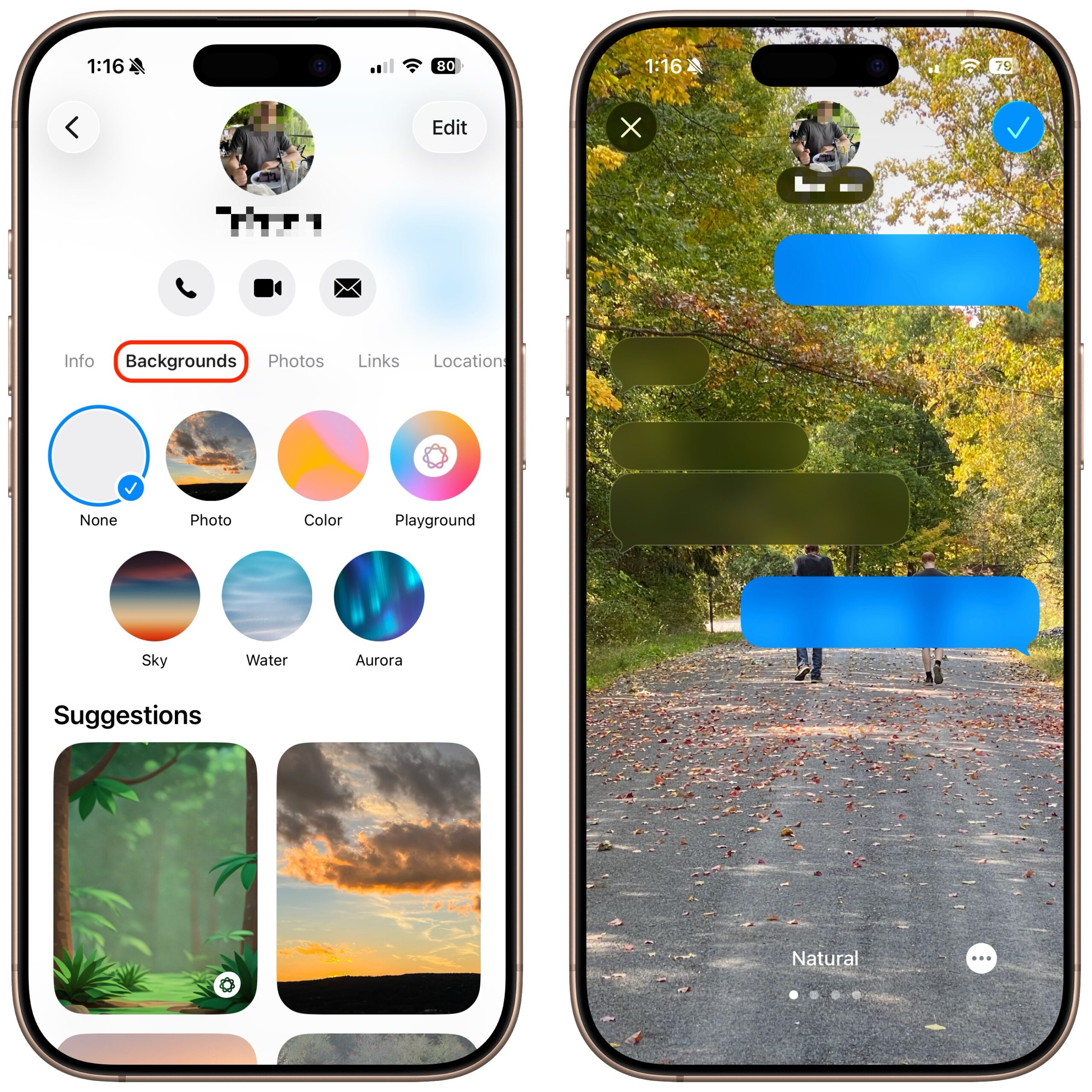
A potentially surprising and fun new feature in Messages in iOS 26, iPadOS 26, and macOS 26 Tahoe is conversation backgrounds. To set one, tap the person or group icon at the top of the conversation, then tap Backgrounds, select an image, and tap the blue checkmark to save. What you might not realize is that conversation backgrounds are shared with others in the conversation who use iOS 26, iPadOS 26, and macOS 26, so be sure to choose appropriate backgrounds. We recommend explaining what you’ve done, as the background can radically change the look of the Messages interface, which some people may find confusing or even upsetting if it happens unexpectedly.
(Featured image by iStock.com/Hector Pertuz)

Useful walkthrough. The concrete examples made the workflow much easier to follow.
Saved my day
The note that Rosetta isn’t automatically restored after the macOS 27 Golden Gate upgrade is the part that would catch…
Useful note that Live Text needs an A12 Bionic or later on iPhone and iPad but works on any Mac…
Just found text to game by Tuvimo and it actually works for quick browser fun. Makes me want to revisit…