
 Image by Ilya Pavlov on Unsplash
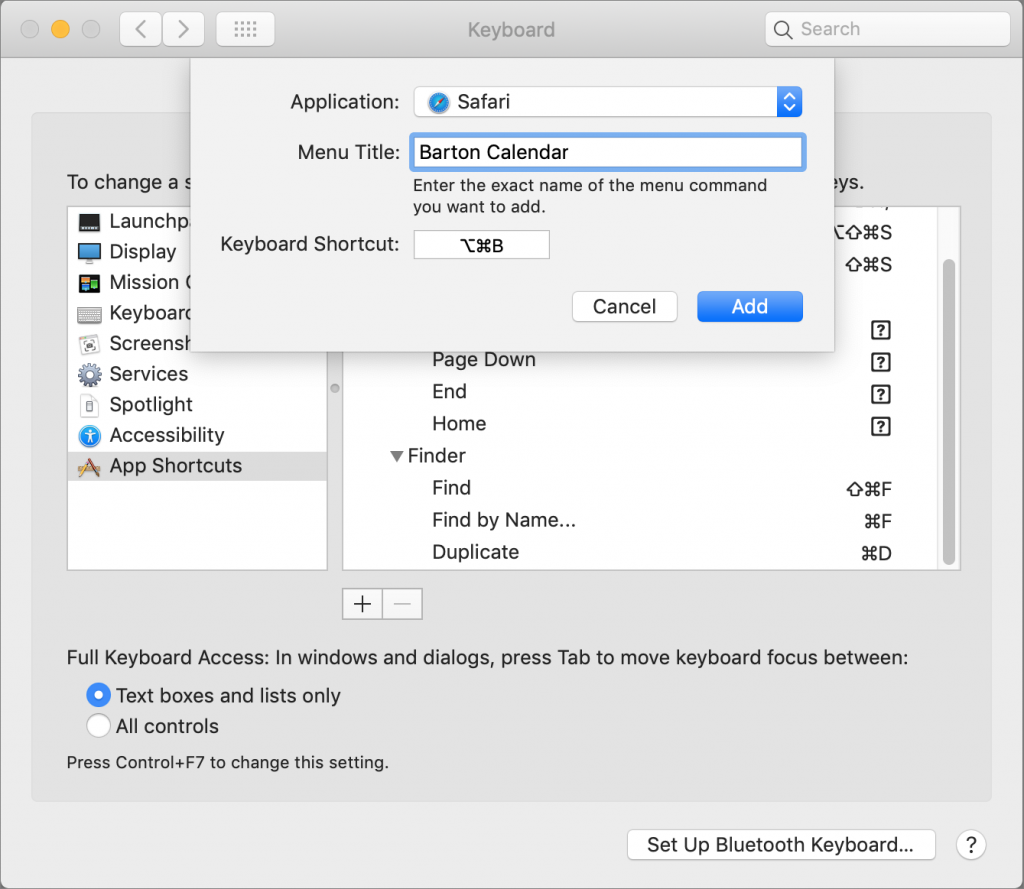
Power users like keyboard shortcuts because it’s faster to press a couple of keys than to navigate lengthy menus. If you have trouble remembering shortcuts, check out KeyCue, which displays a concise table of all currently available shortcuts. But what about menu items that lack shortcuts? Make your own in System Preferences > Keyboard > Shortcuts > App Shortcuts. Click the + button, choose an app from the Application menu, fill in the Menu Title field, click the Keyboard Shortcut field, press your desired key combination, and click Add. You can even make shortcuts for Safari bookmarks, since they appear in the Bookmarks menu. If a shortcut doesn’t work, make sure you typed its menu title exactly right, including any punctuation like three periods for an ellipsis. To edit an item, double-click its title or shortcut in the list. If you no longer want an item, select it and click the – button.

Useful walkthrough. The concrete examples made the workflow much easier to follow.
Saved my day
The note that Rosetta isn’t automatically restored after the macOS 27 Golden Gate upgrade is the part that would catch…
Useful note that Live Text needs an A12 Bionic or later on iPhone and iPad but works on any Mac…
Just found text to game by Tuvimo and it actually works for quick browser fun. Makes me want to revisit…