
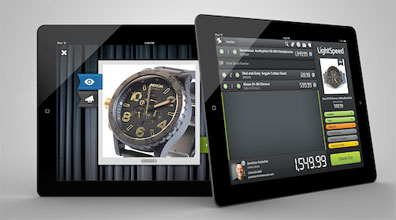
 LightSpeed for iPad brings the LightSpeed Point of Sale experience to Apple’s acclaimed tablet platform, allowing retailers to showcase their products with Show & Tell and process transactions anywhere. LightSpeed for iPad is retail’s first interactive point of sale system, combining next-level personalized selling with inventory scanning, wireless payments and the powerful retail workflows of LightSpeed.
LightSpeed for iPad features the amazing product display technology Show & Tell, which allows sales reps to use iPad to share expanded product details and up to five zoomed images on a stylish curtained backdrop. Switch between showcasing and selling seamlessly, invoicing any product in Show & Tell with a single tap. Outfit your team with this interactive sales tool and start showing your stuff.
Have the freedom to create new invoices, scan products, enter customer information and perform inventory lookups at your front counter, on your showroom floor or even beyond your store at a sales event. Process payments anywhere the iPad takes you, accept signatures on-screen, and email or wirelessly print receipts.
LightSpeed for iPad is compatible with the Socket barcode scanner, iDynamo credit card swipe and the Ingenico i6580 terminal for wirelessly processing credit and debit transactions.
Select the iPad solution that’s integrated with LightSpeed, the complete solution for growing iGeneration retailers. The LightSpeed family of retail tools offers powerful inventory and business workflows for Mac, Mobile and eCommerce. And now, LightSpeed for iPad rewrites the retail playbook by adding the flexibility to showcase and sell anywhere using iPad.
LightSpeed for iPad is a free download from iTunes and requires an available user license on your LightSpeed Server; let Austin MacWorks handle set up and installation for you.

A week might be too short if IT approval is still pending. I'd treat "keeping your old iPhone for a…
Awesome tech breakdown on "When Should You Upgrade to macOS 27 Golden Gate, iOS 27, iPadOS 27, watchOS 27, tvOS…
I’ve used Chrome’s built-in screenshot tool, but opening DevTools every time gets a bit tedious. I recommend FullPage Capture, it’s…
This is such an important reminder. I've been in meetings where an AI notetaker silently joined and recorded everything, and…
Awesome tech breakdown on "When Should You Upgrade to macOS 27 Golden Gate, iOS 27, iPadOS 27, watchOS 27, tvOS…