
 Image by Andrea Piacquadio from Pexels
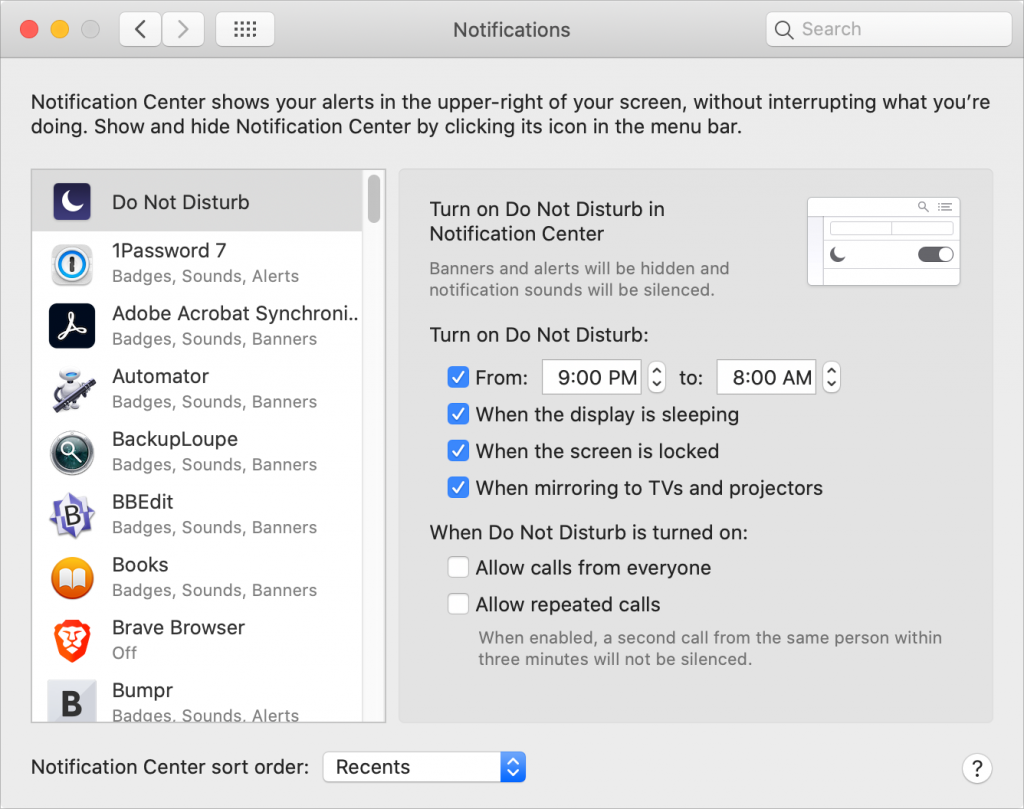
We’re all accustomed to the Do Not Disturb feature on our iPhones since they’re with us for most of the day and often spend the night next to the bed. But Apple long ago added Do Not Disturb to the Mac as well, and it’s useful for muting your Mac at night to eliminate unnecessary noises and for preventing unwanted notifications during presentations. In System Preferences > Notifications > Do Not Disturb, you can tell macOS to turn the feature on during specific times, when the display is sleeping or locked, and when mirroring to another screen. Or, you can turn on Do Not Disturb manually—you might want to do this when giving a presentation with Zoom or another videoconferencing app. In macOS 10.15 Catalina and earlier, do this in Notification Center by clicking it at the far right of the menu bar, scrolling up, and enabling the Do Not Disturb switch. In macOS 11 Big Sur, you find Do Not Disturb in Control Center.

Picking one style guide and living with it is the advice I give every time this question comes up, and…
Golden Gate as the macOS 27 codename is a nice callback. For mixed households I'd love a recommendation on the…
Check with your phone service provider.
Do you take orders for the new 18 or is that just at the Apple stores? Thanks
Making Wi-Fi joining as easy as scanning a QR code is exactly the kind of MacWorks tip guests actually use.