

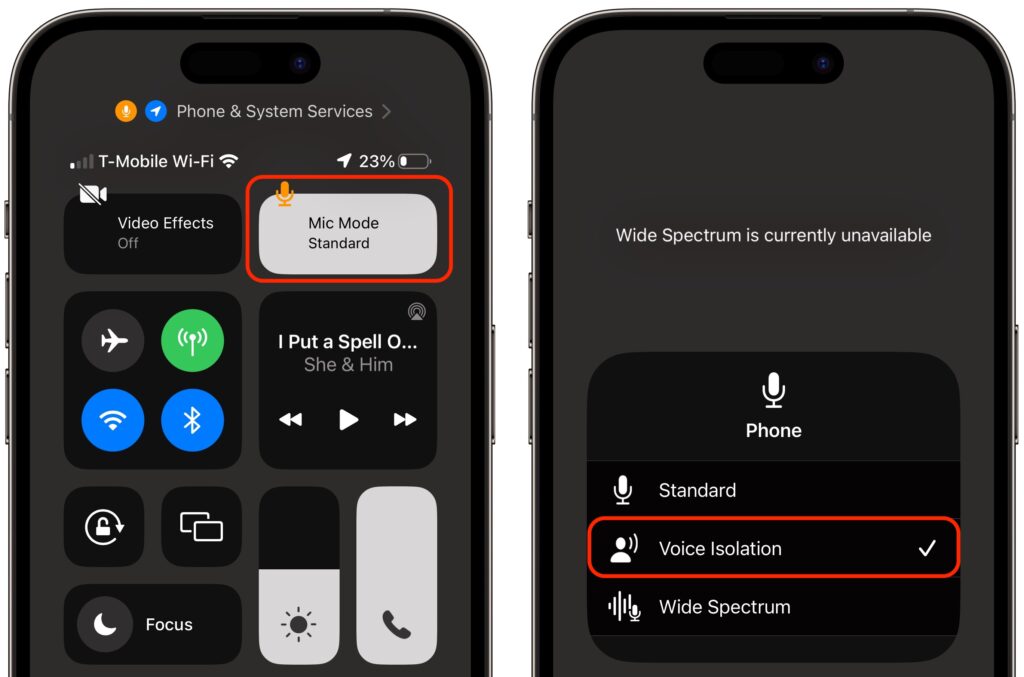
In iOS 15, Apple added the Voice Isolation feature to FaceTime calls to filter out noise around you while you’re talking, which is a boon if you’re making a call in a loud space or outside environment (think Austin’s East 6th Street). With the recently released iOS 16.4, Apple has now brought that feature to cellular calls as well, but it’s not an option in Settings > Phone, as you might expect. Instead, during a call, open Control Center by swiping down from the top right of the screen (Face ID iPhones) or up from the bottom (Touch ID iPhones). Then tap the Mic Mode button and Voice Isolation. You won’t hear any difference, but the person on the other end should be able to hear you better. iOS remembers your setting, so switch back to Standard when you’re done—Voice Isolation may not sound as good as Standard in quiet spaces.
(Featured image by iStock.com/Jub Job)

A week might be too short if IT approval is still pending. I'd treat "keeping your old iPhone for a…
Awesome tech breakdown on "When Should You Upgrade to macOS 27 Golden Gate, iOS 27, iPadOS 27, watchOS 27, tvOS…
I’ve used Chrome’s built-in screenshot tool, but opening DevTools every time gets a bit tedious. I recommend FullPage Capture, it’s…
This is such an important reminder. I've been in meetings where an AI notetaker silently joined and recorded everything, and…
Awesome tech breakdown on "When Should You Upgrade to macOS 27 Golden Gate, iOS 27, iPadOS 27, watchOS 27, tvOS…