
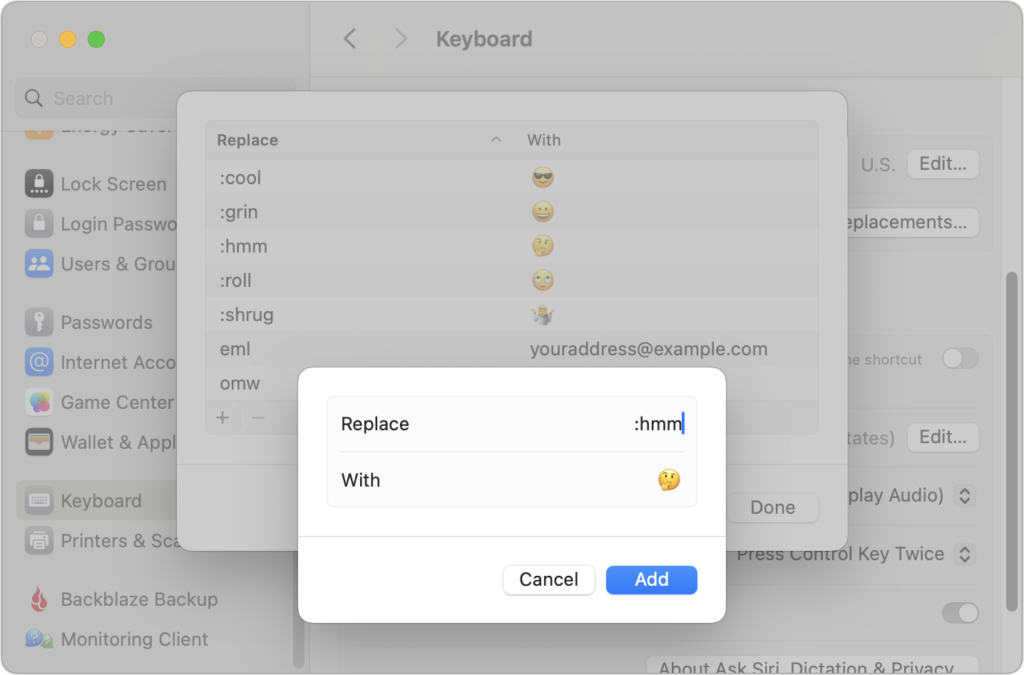
For many of us, emoji are fun, but we don’t want to choose Edit > Emoji & Symbols whenever we want to insert one. A faster, better technique is to set up text replacements for emoji you insert often. Open System Settings > Keyboard > Text Replacements, click the + button at the bottom, and enter the “trigger” text you want to type and the emoji you want entered. You can set the trigger to anything you like, but we prefer the Slack convention of a colon and a few characters from the emoji name, such as :roll for 🙄. Bonus: these replacements sync between your Mac, iPhone, and iPad!
(Featured image based on an original by iStock.com/Yosi Azwan)

Useful walkthrough. The concrete examples made the workflow much easier to follow.
Saved my day
The note that Rosetta isn’t automatically restored after the macOS 27 Golden Gate upgrade is the part that would catch…
Useful note that Live Text needs an A12 Bionic or later on iPhone and iPad but works on any Mac…
Just found text to game by Tuvimo and it actually works for quick browser fun. Makes me want to revisit…