
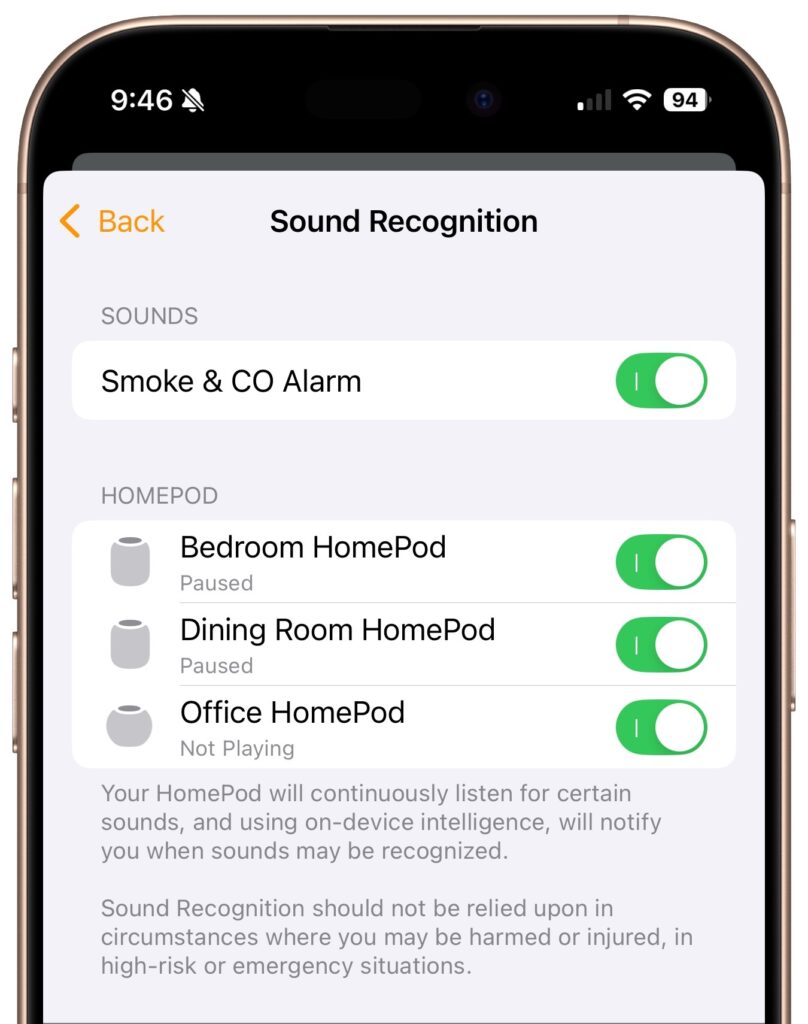
Although we think about HomePods as being useful for playing audio and responding to Siri commands for HomeKit devices, they can do more. HomePods can send a notification to your iPhone if their built-in microphones recognize the piercing squeals from smoke and carbon monoxide alarms. If you are away from home, that notification could help you alert neighbors and call 911, shaving minutes off response times. To turn the feature on, open the Home app, tap the ••• button in the upper-right corner, navigate to Safety & Security > Sound Recognition, and turn on the switches for Smoke & CO Alarm and any HomePods you have.
(Featured image by iStock.com/BrianAJackson)

A week might be too short if IT approval is still pending. I'd treat "keeping your old iPhone for a…
Awesome tech breakdown on "When Should You Upgrade to macOS 27 Golden Gate, iOS 27, iPadOS 27, watchOS 27, tvOS…
I’ve used Chrome’s built-in screenshot tool, but opening DevTools every time gets a bit tedious. I recommend FullPage Capture, it’s…
This is such an important reminder. I've been in meetings where an AI notetaker silently joined and recorded everything, and…
Awesome tech breakdown on "When Should You Upgrade to macOS 27 Golden Gate, iOS 27, iPadOS 27, watchOS 27, tvOS…