

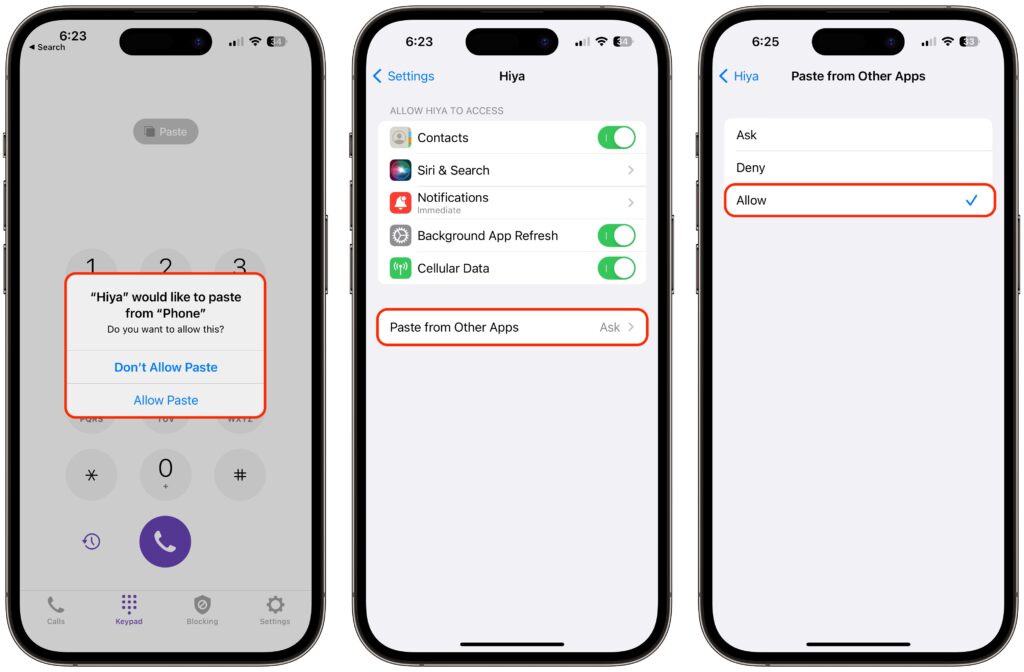
In iOS 16, Apple tightened security by displaying a confirmation alert when you copy data from one app and paste it into another. More security isn’t bad, but these alerts can become annoying if you copy and paste frequently. In iOS 16.1, Apple added a setting to control the behavior for each app. If you get these alerts too often when pasting in an app, go to Settings > AppName > Paste from Other Apps and switch it from Ask to Allow. Many apps don’t include the setting; hopefully, any apps where you paste often will have this setting or include it soon.
(Featured image based on an original by iStock.com/AaronAmat)

Picking one style guide and living with it is the advice I give every time this question comes up, and…
Golden Gate as the macOS 27 codename is a nice callback. For mixed households I'd love a recommendation on the…
Check with your phone service provider.
Do you take orders for the new 18 or is that just at the Apple stores? Thanks
Making Wi-Fi joining as easy as scanning a QR code is exactly the kind of MacWorks tip guests actually use.