
 Image by NeONBRAND on Unsplash
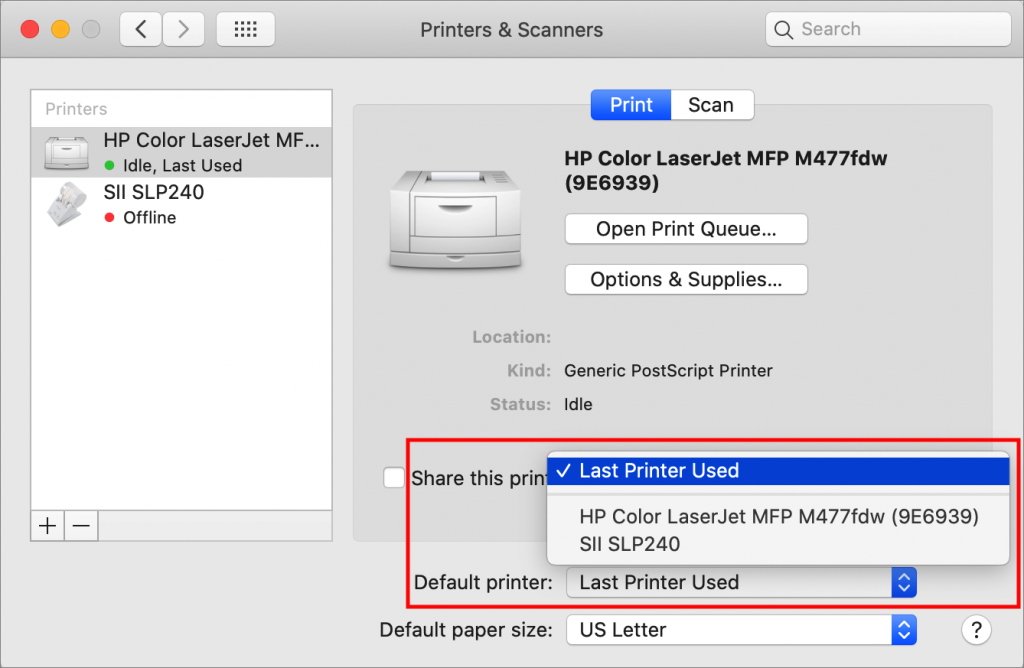
If you have access to multiple printers, you probably know that you can choose one from the Printer pop-up menu at the top of the Print dialog. But macOS has a feature that should make it so you don’t have to switch printers manually as often. Open System Preferences > Printers & Scanners, and look at the bottom of the Print view. The Default Printer pop-up menu lists all your installed printers, plus an option for Last Printer Used. That last one makes sense if you print a number of documents to the big office Canon, switch to printing images on the Epson photo printer for a while, and then switch back again. But if you primarily print to one printer, choose it from the Default Printer pop-up menu. You can still switch to another printer in the Print dialog anytime you want, but your main printer will always be the default.
(Featured i)

Picking one style guide and living with it is the advice I give every time this question comes up, and…
Golden Gate as the macOS 27 codename is a nice callback. For mixed households I'd love a recommendation on the…
Check with your phone service provider.
Do you take orders for the new 18 or is that just at the Apple stores? Thanks
Making Wi-Fi joining as easy as scanning a QR code is exactly the kind of MacWorks tip guests actually use.