
 image by Matthew T Rader from Pexels
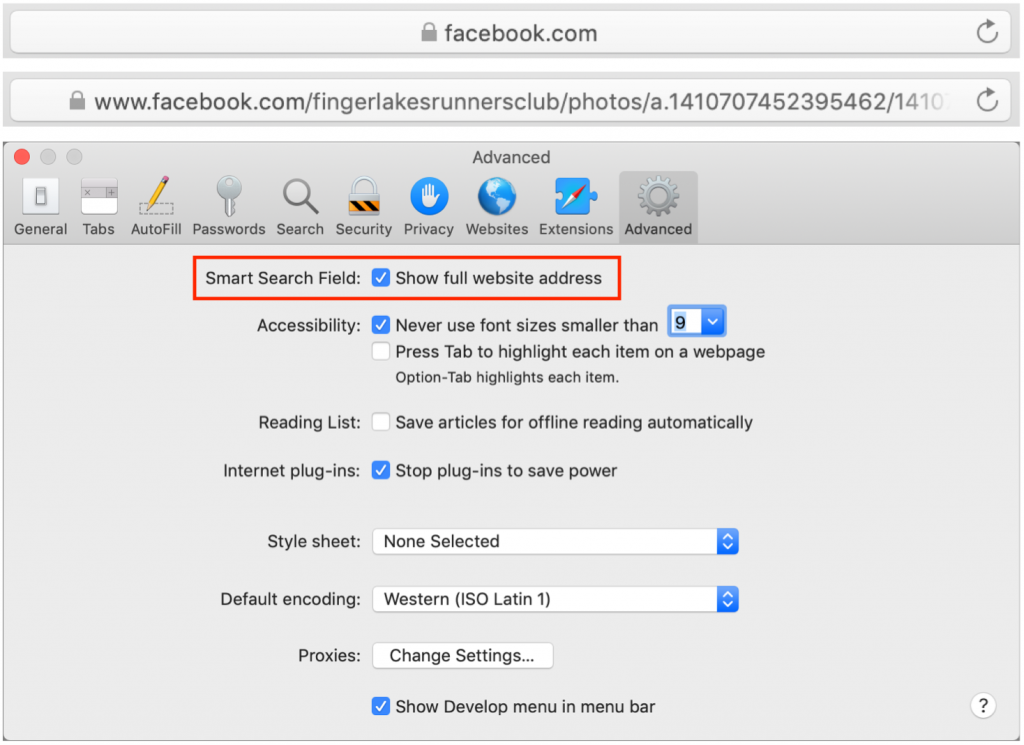
By default, Safari on the Mac hides full Web addresses—technically known as URLs—from you, showing just the site name in the Smart Search field at the top of the window. If you click in the field or press Command-L, the full URL appears, which is good for checking that you’re really where you think you should be and not on some dodgy site. It’s also useful if you need to copy just a portion of the URL to share or otherwise work with. To make that check easier, go to Safari > Preferences > Advanced and next to Smart Search Field, select “Show full website address.” Then you can verify that the URL looks right with a glance.

A week might be too short if IT approval is still pending. I'd treat "keeping your old iPhone for a…
Awesome tech breakdown on "When Should You Upgrade to macOS 27 Golden Gate, iOS 27, iPadOS 27, watchOS 27, tvOS…
I’ve used Chrome’s built-in screenshot tool, but opening DevTools every time gets a bit tedious. I recommend FullPage Capture, it’s…
This is such an important reminder. I've been in meetings where an AI notetaker silently joined and recorded everything, and…
Awesome tech breakdown on "When Should You Upgrade to macOS 27 Golden Gate, iOS 27, iPadOS 27, watchOS 27, tvOS…