

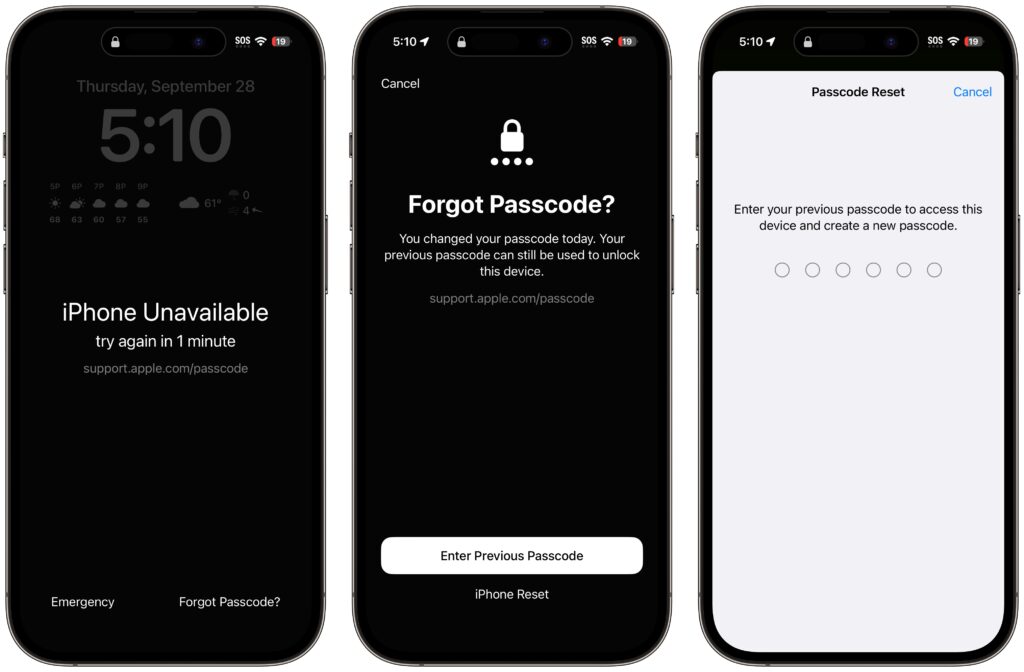
The hardest time to remember your iPhone or iPad passcode is right after you’ve changed it. Generally speaking, there’s no reason to change your passcode, but if you inadvertently or intentionally shared it with someone with whom you wouldn’t trust your bank account information, changing it to something new is a good idea. We could also imagine a child who knows your passcode changing it on you as a prank. For whatever reason, if you can’t enter your new passcode, a new iOS 17 feature called Passcode Reset lets you use your old one for 72 hours. Once you’ve tried the wrong password five times, tap Forgot Passcode ➊, enter your old passcode ➋, and create a new one ➌. If you’re certain you know the new one, you can expire the old one sooner in Settings > Face ID/Touch ID & Passcode.
(Featured image by iStock.com/NazariyKarkhut)

Useful walkthrough. The concrete examples made the workflow much easier to follow.
Saved my day
The note that Rosetta isn’t automatically restored after the macOS 27 Golden Gate upgrade is the part that would catch…
Useful note that Live Text needs an A12 Bionic or later on iPhone and iPad but works on any Mac…
Just found text to game by Tuvimo and it actually works for quick browser fun. Makes me want to revisit…