

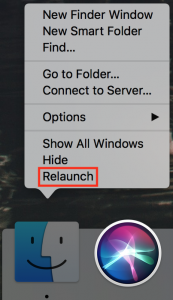
Finder freezes. They shouldn’t happen at all, and they don’t happen often, but it’s not unheard of for your Mac’s Finder to freeze, freak out, or otherwise stop responding properly. To bring it back to life, hold down the Option key, click and hold the Finder icon in the Dock, and choose Relaunch. (If the “click and hold” action feels odd, you can instead hold down Control and Option, and then just click.) In theory, you should be able to keep working normally after the Finder relaunches, but we recommend restarting your Mac afterward just to be safe.

Picking one style guide and living with it is the advice I give every time this question comes up, and…
Golden Gate as the macOS 27 codename is a nice callback. For mixed households I'd love a recommendation on the…
Check with your phone service provider.
Do you take orders for the new 18 or is that just at the Apple stores? Thanks
Making Wi-Fi joining as easy as scanning a QR code is exactly the kind of MacWorks tip guests actually use.