

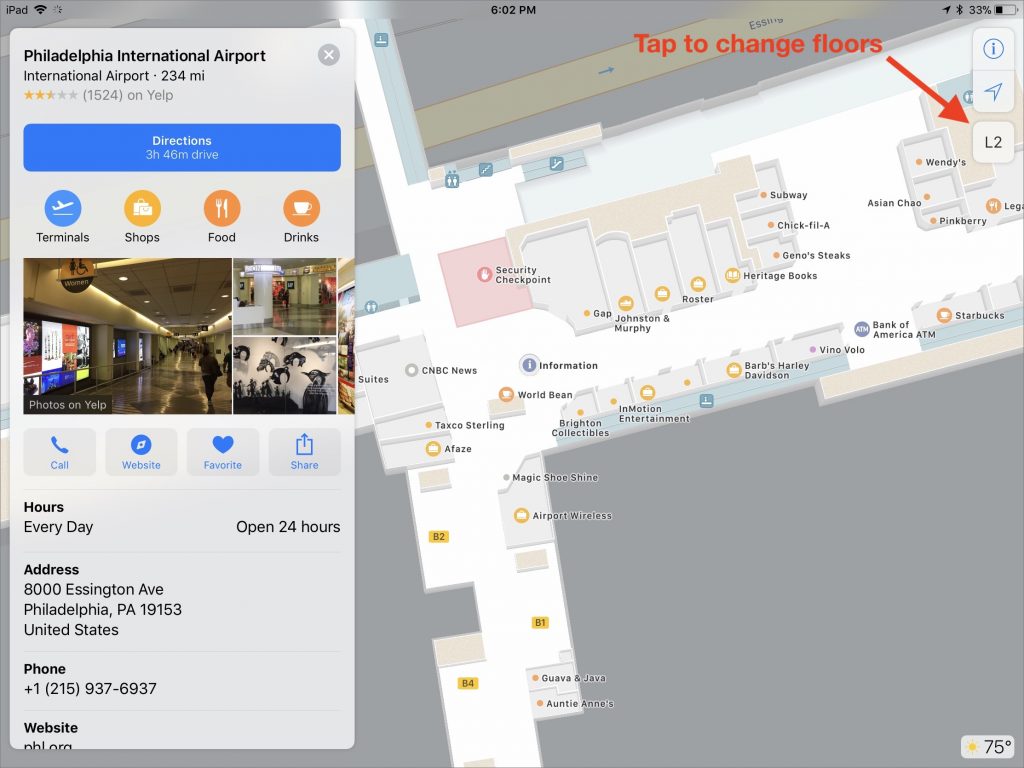
When you’re in a huge mall or airport, it’s all too easy to take a wrong turn and get lost. Happily, your iPhone will increasingly be able to help prevent that. Maps in iOS 11 now knows about some indoor places, such as the Philadelphia International Airport and the Westfield San Francisco Centre mall. Zoom in to such a place in Maps, and it shows you a detailed floor plan. In an airport, you can view terminals, boarding gates, security checkpoints, baggage claim carousels, parking garages, and restaurants. For malls, Maps lets you filter the view by store type or to show restroom locations. Notice the icon that lets you switch floors! Apple is adding more airports and malls all the time.

A week might be too short if IT approval is still pending. I'd treat "keeping your old iPhone for a…
Awesome tech breakdown on "When Should You Upgrade to macOS 27 Golden Gate, iOS 27, iPadOS 27, watchOS 27, tvOS…
I’ve used Chrome’s built-in screenshot tool, but opening DevTools every time gets a bit tedious. I recommend FullPage Capture, it’s…
This is such an important reminder. I've been in meetings where an AI notetaker silently joined and recorded everything, and…
Awesome tech breakdown on "When Should You Upgrade to macOS 27 Golden Gate, iOS 27, iPadOS 27, watchOS 27, tvOS…