

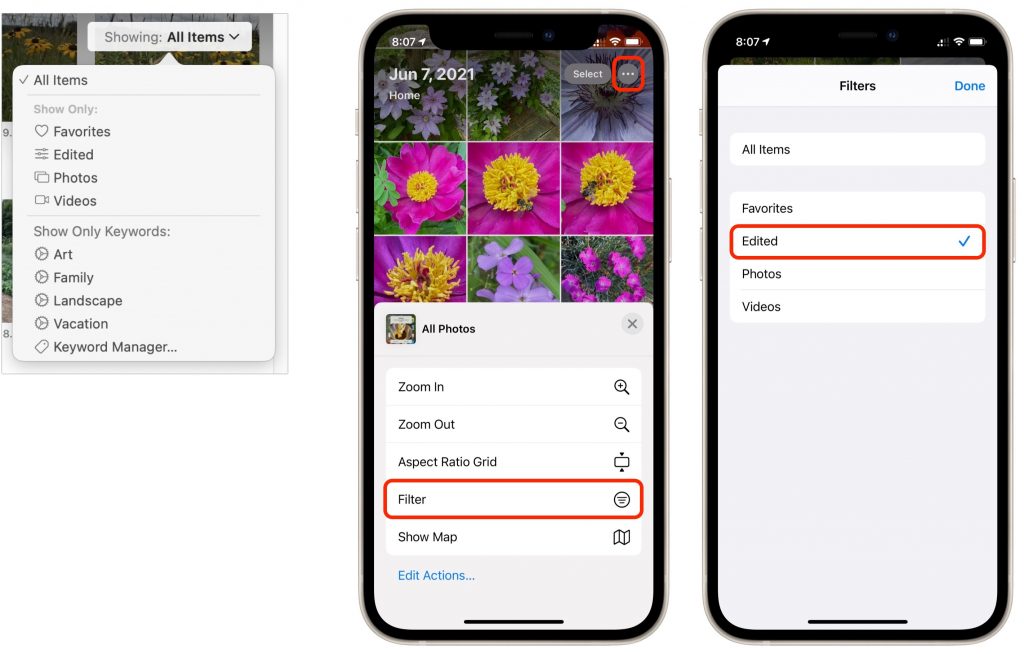
You know you can make albums and smart albums in Photos, and do searches to find photos that contain particular objects. But what if you want to separate photos from videos, identify which images in an album have been edited, or pick out just the ones you’ve favorited? For that, use Photos’ filters. On the Mac (below left), click the Showing menu in the upper-right corner, and in iOS and iPadOS (iPhone screens below right), tap the ••• button in the upper-right corner and tap Filter. Either way, you can choose Favorites, Edited, Photos, or Videos to limit the items showing to that type. When you’re done, turn the filter off by choosing All Items.
(Featured image by iStock.com/metamorworks)

A week might be too short if IT approval is still pending. I'd treat "keeping your old iPhone for a…
Awesome tech breakdown on "When Should You Upgrade to macOS 27 Golden Gate, iOS 27, iPadOS 27, watchOS 27, tvOS…
I’ve used Chrome’s built-in screenshot tool, but opening DevTools every time gets a bit tedious. I recommend FullPage Capture, it’s…
This is such an important reminder. I've been in meetings where an AI notetaker silently joined and recorded everything, and…
Awesome tech breakdown on "When Should You Upgrade to macOS 27 Golden Gate, iOS 27, iPadOS 27, watchOS 27, tvOS…