

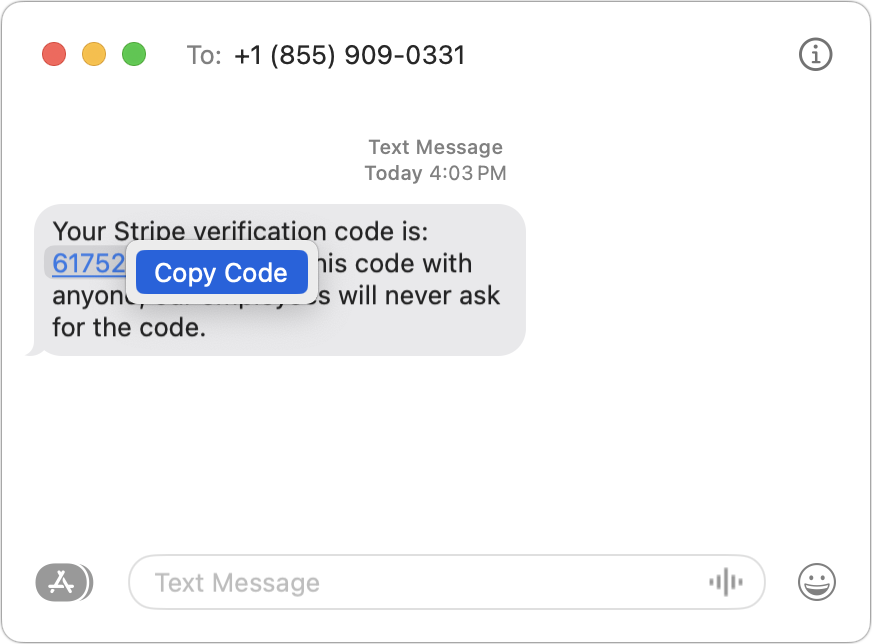
One welcome feature of Safari is its automatic detection and auto-filling of SMS-based two-factor authentication codes you receive in Messages. It allows you to complete your login quickly, without having to retrieve the code from Messages. But what if you use a different Web browser, like Google Chrome, Firefox, Brave, or Arc? Apple doesn’t allow other developers access to those codes in Messages, but Messages itself recognizes the verification code, marking it with an underline. Rather than transcribing the code manually like an animal, you can Control-click the underlined numbers and choose Copy Code. Then, switch to your Web browser and press Command-V to paste it. Not all websites accept pasted codes, but most will, even if they present a custom interface.
(Featured image by iStock.com/Galeanu Mihai)

A week might be too short if IT approval is still pending. I'd treat "keeping your old iPhone for a…
Awesome tech breakdown on "When Should You Upgrade to macOS 27 Golden Gate, iOS 27, iPadOS 27, watchOS 27, tvOS…
I’ve used Chrome’s built-in screenshot tool, but opening DevTools every time gets a bit tedious. I recommend FullPage Capture, it’s…
This is such an important reminder. I've been in meetings where an AI notetaker silently joined and recorded everything, and…
Awesome tech breakdown on "When Should You Upgrade to macOS 27 Golden Gate, iOS 27, iPadOS 27, watchOS 27, tvOS…