
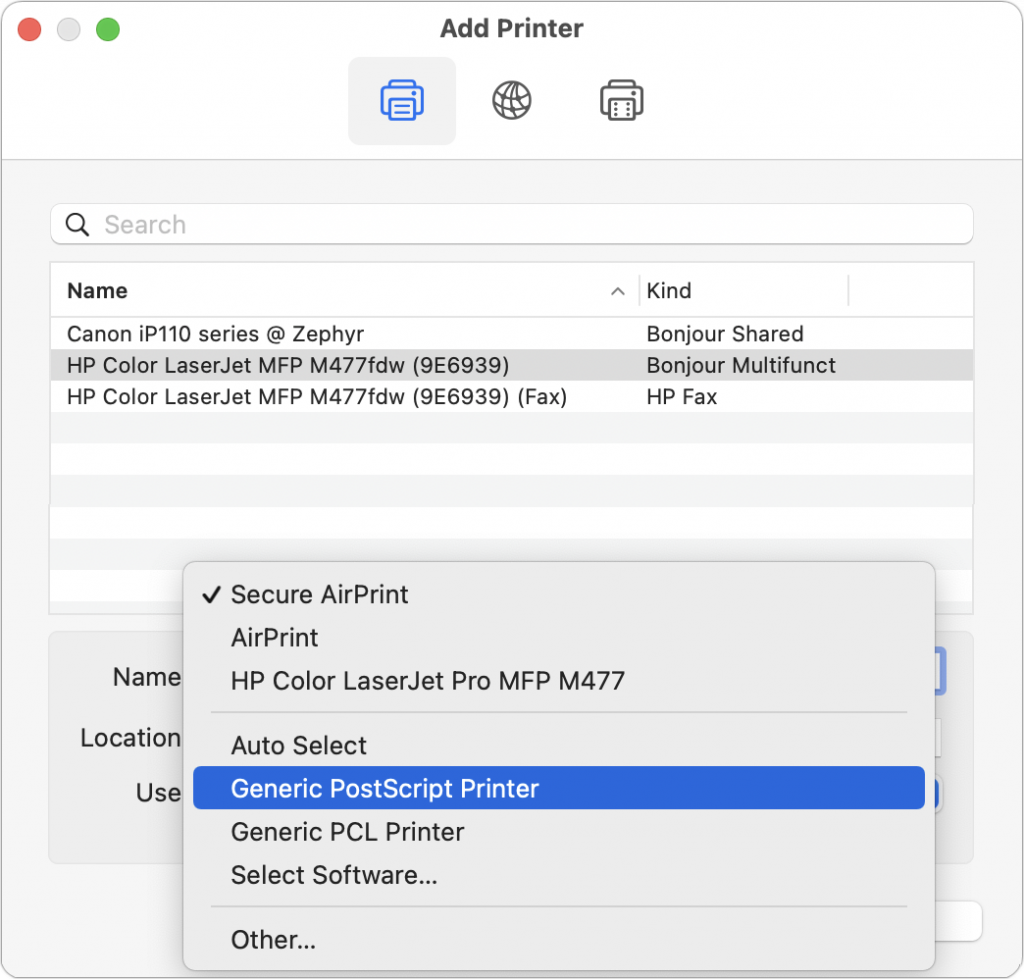
Some clients have reported problems with HP laser printers failing to print. Sometimes there’s an error. Other times, the print job just disappears into the ether. It’s unclear why this is happening or how widespread it is, but here’s a workaround that can help. Create a new printer configuration by clicking the + button in System Preferences > Printers & Scanners and selecting your printer in the list. Then, from the Use pop-up menu, choose something other than the default Secure AirPrint driver. We’ve had the most luck with Generic PostScript Printer. Both the old and new configurations will be available when printing, so if one doesn’t work, try again with the other one.
(Featured image by Mahrous Houses on Unsplash)

A week might be too short if IT approval is still pending. I'd treat "keeping your old iPhone for a…
Awesome tech breakdown on "When Should You Upgrade to macOS 27 Golden Gate, iOS 27, iPadOS 27, watchOS 27, tvOS…
I’ve used Chrome’s built-in screenshot tool, but opening DevTools every time gets a bit tedious. I recommend FullPage Capture, it’s…
This is such an important reminder. I've been in meetings where an AI notetaker silently joined and recorded everything, and…
Awesome tech breakdown on "When Should You Upgrade to macOS 27 Golden Gate, iOS 27, iPadOS 27, watchOS 27, tvOS…