

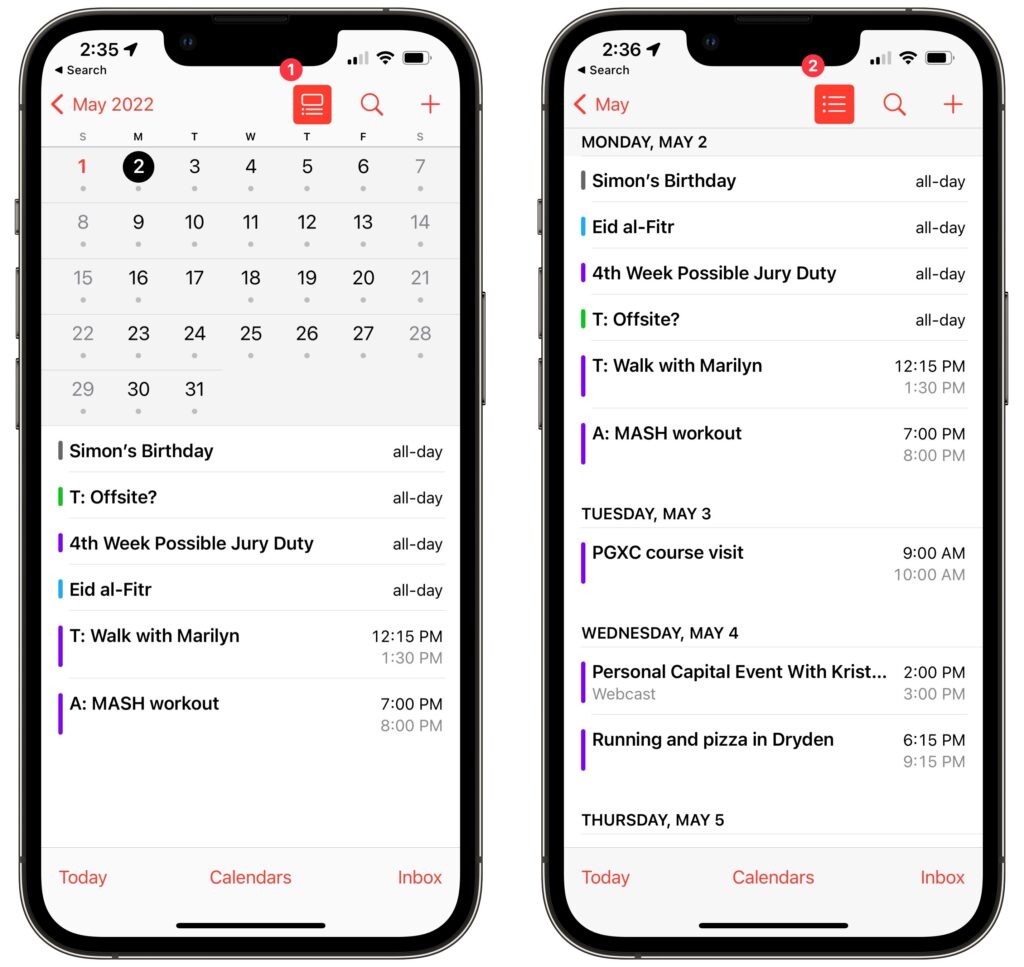
The iPhone’s Calendar app defaults to graphical views for Day, Week (rotate to landscape), Month, and Year, but only the Day view shows information about your actual events, and even then, it’s easy to miss events that are outside the times that fit onscreen. If you find those views frustrating, you may have missed the all-important list view options. In Month view, tap the List button ➊ to split the screen, showing the calendar above and a list of events for the selected day below. In Day view, tap the List button ➋ to switch to a more easily scanned list for each day.
(Featured image by iStock.com/gpointstudio)

A week might be too short if IT approval is still pending. I'd treat "keeping your old iPhone for a…
Awesome tech breakdown on "When Should You Upgrade to macOS 27 Golden Gate, iOS 27, iPadOS 27, watchOS 27, tvOS…
I’ve used Chrome’s built-in screenshot tool, but opening DevTools every time gets a bit tedious. I recommend FullPage Capture, it’s…
This is such an important reminder. I've been in meetings where an AI notetaker silently joined and recorded everything, and…
Awesome tech breakdown on "When Should You Upgrade to macOS 27 Golden Gate, iOS 27, iPadOS 27, watchOS 27, tvOS…