

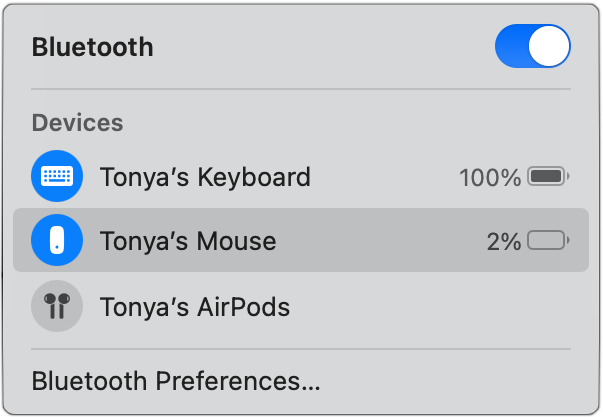
It’s unfortunate that the most recent iteration of the Magic Mouse has its Lightning charging port on the bottom, making it impossible to use while charging, unlike the Magic Keyboard and Magic Trackpad, which work fine when plugged in. To check if your Magic Mouse needs charging before it starts to nag (and starts acting a little funky), look in one of these spots. If your menu bar is displaying the Bluetooth icon, click it, and the charge level should show up. Or click the Control Center icon on the menu bar and click Bluetooth. You can also look in System Preferences, in either the Bluetooth preference pane or the Mouse preference pane. In our experience, the Bluetooth menu is the easiest, but Control Center and the Mouse preference pane are the most reliable—sometimes the charge level doesn’t appear in the menu.
(Featured image by iStock.com/Alex Sholom)

A week might be too short if IT approval is still pending. I'd treat "keeping your old iPhone for a…
Awesome tech breakdown on "When Should You Upgrade to macOS 27 Golden Gate, iOS 27, iPadOS 27, watchOS 27, tvOS…
I’ve used Chrome’s built-in screenshot tool, but opening DevTools every time gets a bit tedious. I recommend FullPage Capture, it’s…
This is such an important reminder. I've been in meetings where an AI notetaker silently joined and recorded everything, and…
Awesome tech breakdown on "When Should You Upgrade to macOS 27 Golden Gate, iOS 27, iPadOS 27, watchOS 27, tvOS…