
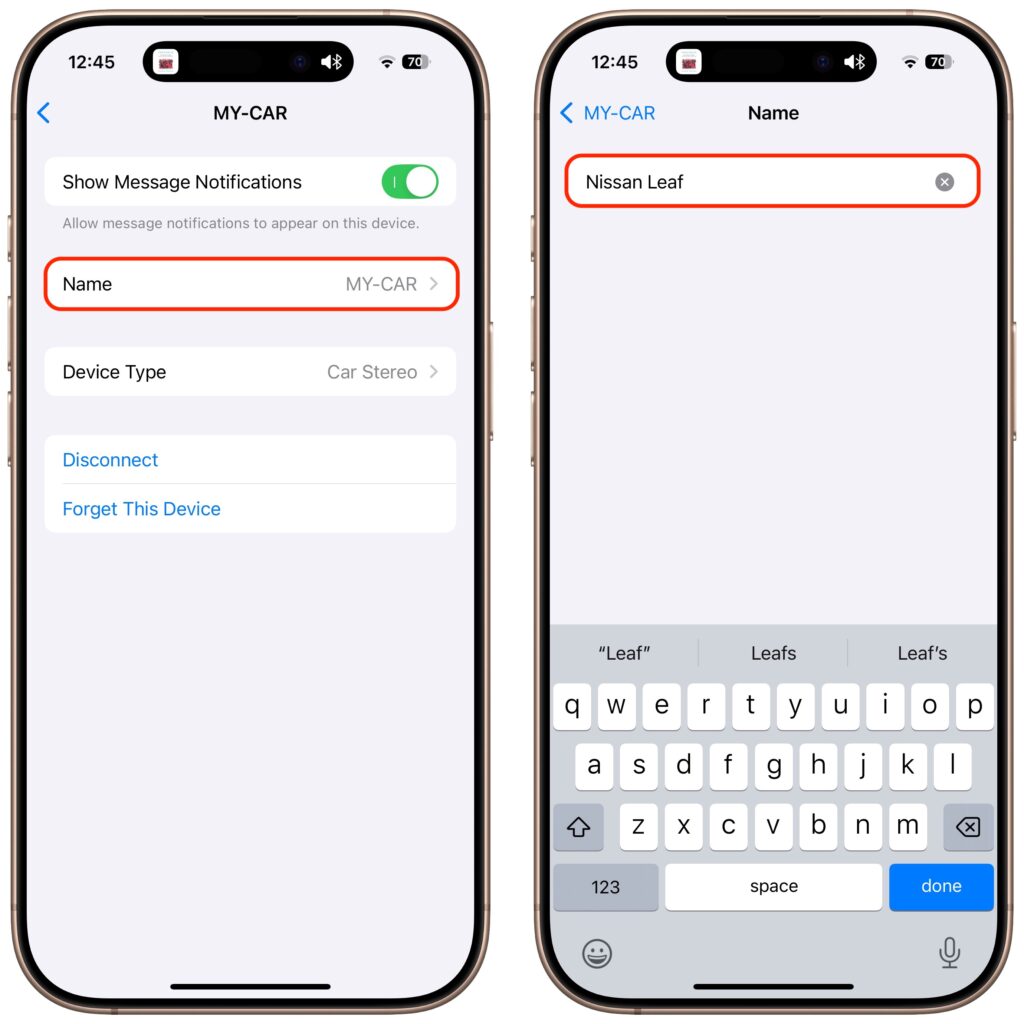
All Bluetooth devices come with a name, but those names are often difficult to decipher, such as ATUMTEK, DX01Gu, and MY-CAR, making it hard to remember which is which in your iPhone’s Bluetooth settings. What you may not realize is that you can rename many Bluetooth devices to tidy up that list. Go to Settings > Bluetooth, connect to the device, and tap the blue ⓘ button to the right of its name. If you can rename the device, you’ll be able to tap the Name field and enter a new one. While you’re here, note the Device Type menu, which lets you choose from Car Stereo, Headphone, Hearing Aid, Speaker, and Other. Apple says that specifying the correct device type can ensure greater accuracy for the Headphone Audio Level measurements, which iOS uses to warn you about prolonged exposure to loud audio.
(Featured image based on originals by iStock.com/Pantherius and iStock.com/Meepian Graphic)

Picking one style guide and living with it is the advice I give every time this question comes up, and…
Golden Gate as the macOS 27 codename is a nice callback. For mixed households I'd love a recommendation on the…
Check with your phone service provider.
Do you take orders for the new 18 or is that just at the Apple stores? Thanks
Making Wi-Fi joining as easy as scanning a QR code is exactly the kind of MacWorks tip guests actually use.