

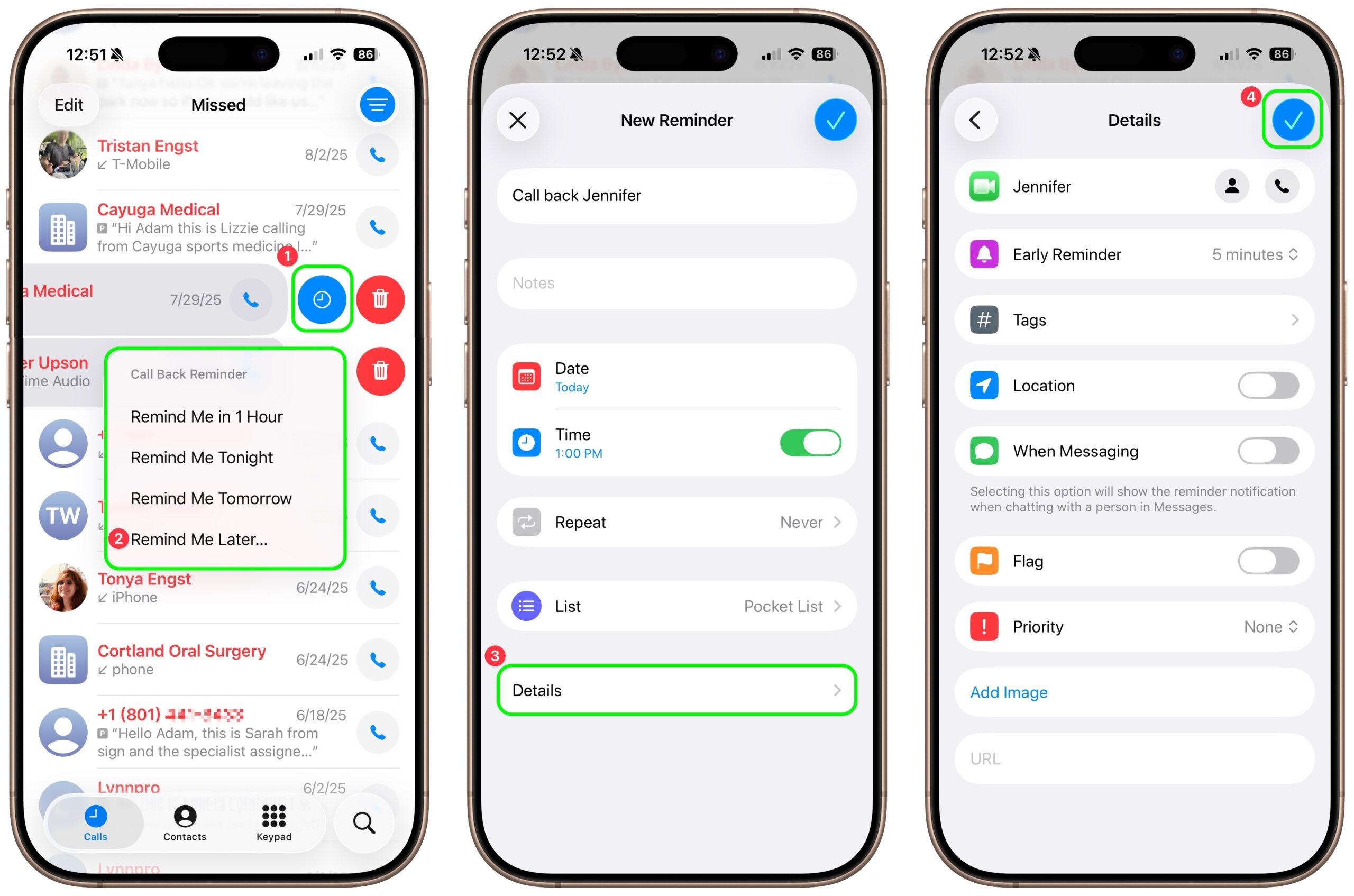
Apple introduced a neat new feature in the Phone app in iOS 26 and iPadOS 26 (but not macOS 26): callback reminders. Whenever you miss a call and think, “I’d better call this person back later,” you can now create a reminder to do that right within the Phone app. Swipe left on any call, tap the blue clock icon ➊, and select Remind Me in 1 Hour, Tonight, Tomorrow, or Later ➋. The first three options create a reminder in your default Reminders list immediately; Remind Me Later opens the New Reminder editor so you can set a specific time and add details ➌. Tap the blue checkmark button to save your changes ➍.
(Featured image by iStock.com/le_cyclope)

Picking one style guide and living with it is the advice I give every time this question comes up, and…
Golden Gate as the macOS 27 codename is a nice callback. For mixed households I'd love a recommendation on the…
Check with your phone service provider.
Do you take orders for the new 18 or is that just at the Apple stores? Thanks
Making Wi-Fi joining as easy as scanning a QR code is exactly the kind of MacWorks tip guests actually use.