
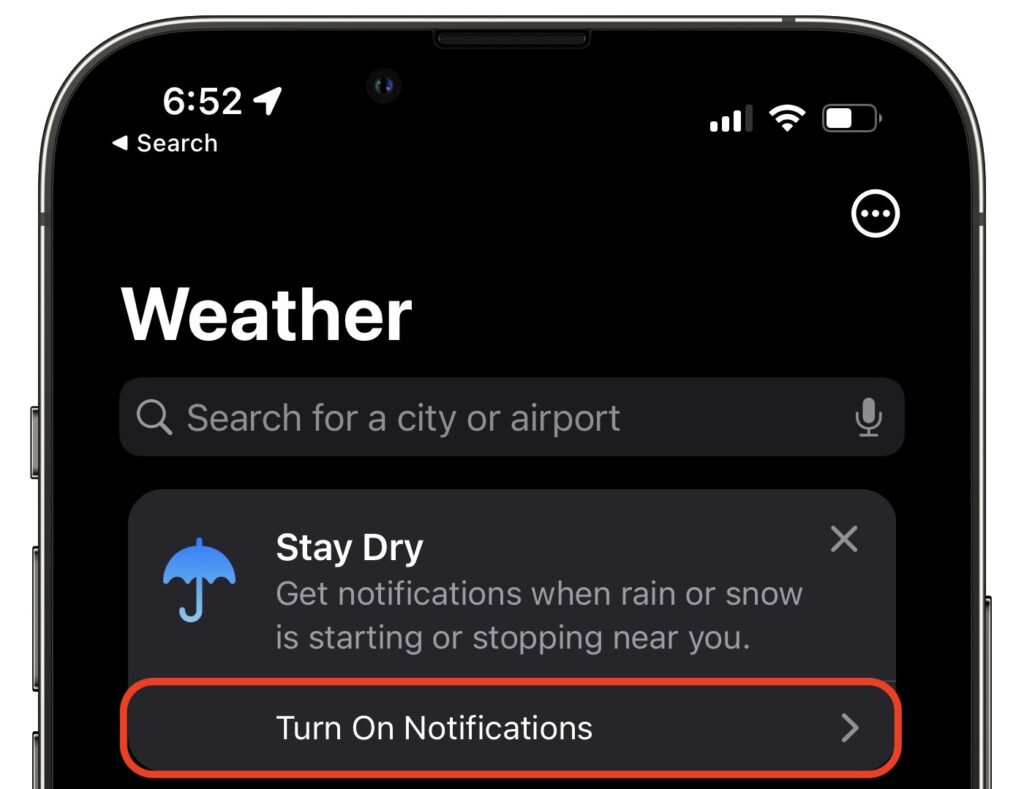
Thanks to Apple’s 2020 acquisition of weather company Dark Sky, the iPhone’s Weather app has learned some new tricks in iOS 15. (It still isn’t available on the iPad, oddly.) Most obvious is its addition of weather maps that can show precipitation, temperature, and air quality. More subtle are the notifications that can alert you to incoming precipitation at your precise location. To turn them on in Weather, tap the location button in the lower-right corner of the screen, tap Turn On Notifications, and agree to the necessary location and notification permissions when prompted. (You can also do this later in Settings > Weather > Location and Settings > Weather > Notifications.) From then on, whenever Weather thinks precipitation is about to start or stop at any of your preset locations, you’ll get an alert. Some people find that Weather’s notifications aren’t as frequent or accurate as those from other weather apps like CARROT Weather, but Apple will likely be improving the system.
(Featured image by iStock.com/trendobjects)

A week might be too short if IT approval is still pending. I'd treat "keeping your old iPhone for a…
Awesome tech breakdown on "When Should You Upgrade to macOS 27 Golden Gate, iOS 27, iPadOS 27, watchOS 27, tvOS…
I’ve used Chrome’s built-in screenshot tool, but opening DevTools every time gets a bit tedious. I recommend FullPage Capture, it’s…
This is such an important reminder. I've been in meetings where an AI notetaker silently joined and recorded everything, and…
Awesome tech breakdown on "When Should You Upgrade to macOS 27 Golden Gate, iOS 27, iPadOS 27, watchOS 27, tvOS…