

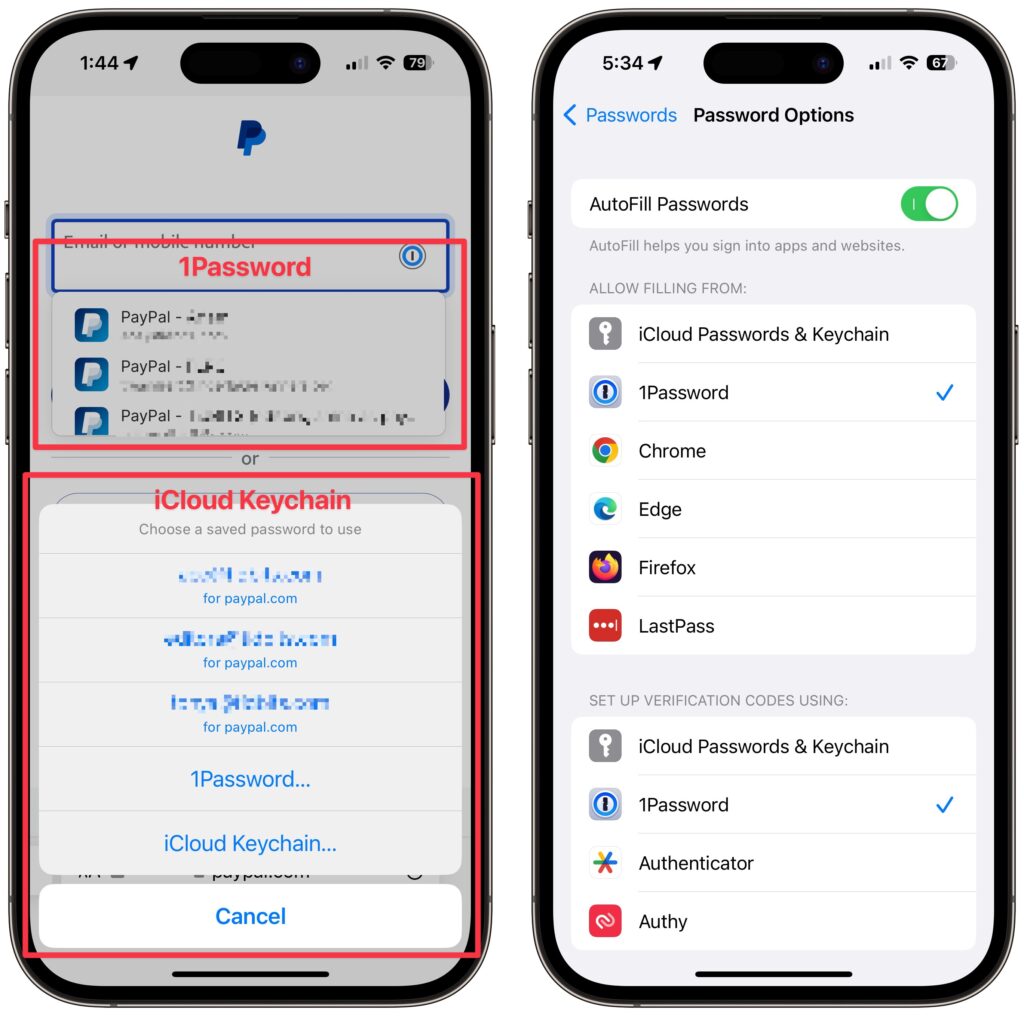
Let’s say you use 1Password (or another third-party password manager) on an iPhone or iPad. When that’s the case, it’s easy to end up in a situation where your device will present passwords from both 1Password and iCloud Keychain, possibly along with another app. That won’t break anything, but as you can see in the screenshot below, dueling password managers can be confusing, particularly if one doesn’t have up-to-date passwords. To make logging in easier, go to Settings > Passwords > Password Options and select just one app in Allow Filling From. For instance, if you’re using 1Password, turn off iCloud Passwords & Keychain and all the other apps.
(Featured image based on an original by iStock.com/Kostiantyn Filichkin)

A week might be too short if IT approval is still pending. I'd treat "keeping your old iPhone for a…
Awesome tech breakdown on "When Should You Upgrade to macOS 27 Golden Gate, iOS 27, iPadOS 27, watchOS 27, tvOS…
I’ve used Chrome’s built-in screenshot tool, but opening DevTools every time gets a bit tedious. I recommend FullPage Capture, it’s…
This is such an important reminder. I've been in meetings where an AI notetaker silently joined and recorded everything, and…
Awesome tech breakdown on "When Should You Upgrade to macOS 27 Golden Gate, iOS 27, iPadOS 27, watchOS 27, tvOS…