
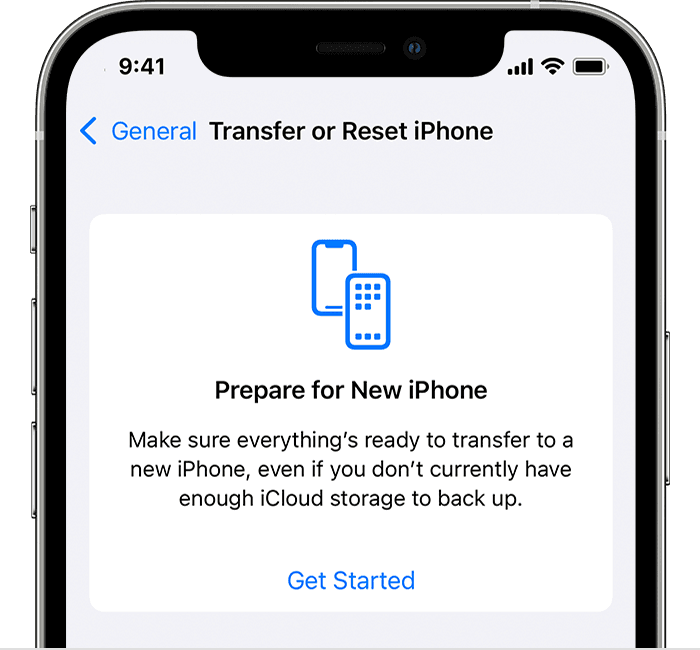
When you move from an old iPhone or iPad to a new one, the easiest approach is often the Quick Start device-to-device transfer. But if that doesn’t work, or if you have to give up one device before receiving the other, iCloud Backup is a fine alternative. Fine, that is, if you have enough iCloud storage space, which many people with the free 5 GB plan do not. For devices running iOS 15 or iPadOS 15, Apple just introduced the option to create a temporary iCloud backup that’s larger than the available space. Tap Settings > General > Transfer or Reset Device > Get Started to create the backup. You have 21 days (plus another 21 if necessary) to restore that backup, and it sticks around for another 7 days after you restore.
(Featured image by iStock.com/honley)

A week might be too short if IT approval is still pending. I'd treat "keeping your old iPhone for a…
Awesome tech breakdown on "When Should You Upgrade to macOS 27 Golden Gate, iOS 27, iPadOS 27, watchOS 27, tvOS…
I’ve used Chrome’s built-in screenshot tool, but opening DevTools every time gets a bit tedious. I recommend FullPage Capture, it’s…
This is such an important reminder. I've been in meetings where an AI notetaker silently joined and recorded everything, and…
Awesome tech breakdown on "When Should You Upgrade to macOS 27 Golden Gate, iOS 27, iPadOS 27, watchOS 27, tvOS…